Best SEO Tools for Small Businesses: 9 Tools I Actually Use
By Makedonka Tochevska · Last Edited November 2026
The best SEO tools for small businesses are the ones that help you find the right keywords, catch technical problems, monitor your search visibility, improve website performance, and measure what’s actually working. You don’t need dozens of SEO subscriptions to do that well.
For my own agency and client websites, I regularly use a stack that includes Semrush, Google Search Console, Screaming Frog, Google Analytics, Rank Math, PageSpeed Insights, GTmetrix, Bing Webmaster Tools, and Schema Markup Validator.
I didn’t choose these tools because they appear on every “best SEO software” list. They’re tools I actually use for different parts of the SEO process, from researching keywords and planning site structure to finding technical issues, checking indexing, monitoring performance, and validating structured data.
Some are completely free, while others are worth paying for when you need deeper research or more advanced functionality. But more tools don’t necessarily mean better SEO. If two platforms solve the same problem, there’s often little reason for a small business to pay for both.
In this guide, I’ll show you what I use each SEO tool for, which ones I consider essential, which are optional, and where you can avoid paying for capabilities you already have.
TL;DR: Best SEO Tools for Small Businesses
- The best SEO tools for small businesses are: Semrush, Google Search Console, Screaming Frog, Google Analytics, Rank Math, PageSpeed Insights, GTmetrix, Bing Webmaster Tools, and Schema Markup Validator.
- You don’t need dozens of SEO tools. A small stack that covers keyword research, technical SEO, indexing, performance, and measurement is usually more useful than paying for several tools with overlapping features.
- My go-to paid SEO tool is Semrush because I use it for keyword research, competitor analysis, SERP research, and evaluating whether a keyword is actually worth targeting.
- Google Search Console is essential for monitoring indexing and understanding how your website performs in Google Search.
- Screaming Frog is one of my most useful technical SEO tools. I use it to crawl websites and find technical problems that would take much longer to check manually.
- You can do a lot for free. Google Search Console, PageSpeed Insights, Google Analytics, Bing Webmaster Tools, Schema Markup Validator, and Screaming Frog can cover many important SEO tasks without another paid subscription.
- Avoid paying twice for the same capability. Before subscribing to another SEO tool, check whether a tool you already use can do the job.
- If I were starting SEO for a small business today, I’d prioritize keyword research and technical SEO first: establish what the website should target, then make sure technical problems aren’t holding it back.
TABLE OF CONTENTS
- Best SEO Tools for Small Businesses at a Glance
- How I Chose These SEO Tools
- Semrush — Best for Keyword and Competitor Research
- Google Search Console — Best for Google Search Visibility
- Screaming Frog — Best for Technical SEO Audits
- Google Analytics (GA4) — Best for Understanding Visitors
- Rank Math — Best for WordPress On-Page SEO
- PageSpeed Insights — Best for Website Performance
- GTmetrix — Best as a Second Performance Testing Too
- Bing Webmaster Tools — Best for Bing Search Visibility
- Schema Markup Validator — Best for Structured Data
- Which SEO Tools Does a Small Business Actually Need?
- Best Free SEO Tools for Small Businesses
- If I Could Pay for Only One SEO Tool
- My Actual SEO Tool Stack and Workflow
- Don’t Pay for SEO Tools That Do the Same Job
- Free vs Paid SEO Tools
- What SEO Tools Can’t Do for You
- How to Choose the Right SEO Tools
- FAQs About SEO Tools for Small Businesses
- Final Thoughts
The Best SEO Tools for Small Businesses at a Glance
There isn’t one SEO tool that does everything equally well. I use different tools for different parts of the process, and several of the most useful ones are free.
Here’s a quick comparison of the nine SEO tools in my current stack before we look at how I use each one.
| SEO Tool | Best For | Free or Paid | What I Use It For | Does a Small Business Need It? |
|---|---|---|---|---|
| Semrush | Keyword & competitor research | Paid + limited free access | Keyword evaluation, competitor and SERP research | Depends — a strong research tool is important |
| Google Search Console | Google Search performance & indexing | Free | Indexing, queries, clicks, impressions and search performance | Yes |
| Screaming Frog | Technical SEO audits | Free + paid | Crawling websites and finding technical SEO issues | Highly recommended |
| Google Analytics (GA4) | Website analytics | Free | Measuring traffic and website performance | Recommended |
| Rank Math | WordPress on-page SEO | Free + paid | On-page SEO and WordPress SEO configuration | Recommended for WordPress sites |
| PageSpeed Insights | Website performance | Free | Diagnosing performance and Core Web Vitals | Yes |
| GTmetrix | Performance testing | Free + paid | Additional website speed and performance diagnostics | Optional |
| Bing Webmaster Tools | Bing search visibility | Free | Monitoring search performance and indexing in Bing | Recommended |
| Schema Markup Validator | Structured data | Free | Checking and validating schema markup | When needed |
If you’re starting from zero, don’t interpret this table as nine tools you need to buy or use every day. Start with the free essentials, then add tools when there’s a specific SEO problem or research need they can solve.
For me, the two tools that play the biggest role at the beginning of an SEO project are Semrush and Screaming Frog. Semrush helps me establish what keywords and search opportunities the website should target, while Screaming Frog helps me understand whether technical SEO issues could get in the way of that strategy.
The rest of the stack fills specific gaps: Search Console shows what’s happening in Google Search, GA4 measures what happens on the website, PageSpeed Insights and GTmetrix help diagnose performance, Rank Math helps implement on-page SEO in WordPress, Bing Webmaster Tools covers Bing visibility, and Schema Markup Validator helps verify structured data.
How I Chose These SEO Tools
I didn’t choose these tools based on which platforms are the most popular or which ones appear most often in other SEO roundups. Every tool on this list is part of my actual SEO workflow and has a specific job to do.
When I’m working on MaTox or a client website, I use Semrush for keyword and competitor research, Screaming Frog for technical audits, Google Search Console for indexing and search performance, and PageSpeed Insights and GTmetrix for performance diagnostics. Rank Math helps me implement on-page SEO on WordPress websites, while GA4, Bing Webmaster Tools, and Schema Markup Validator cover measurement, additional search visibility, and structured data.
The main criteria I used to choose these tools were simple:
- It solves a real SEO problem. I don’t want another dashboard just because it has dozens of features.
- I actually use the information it provides. A tool is only useful if its data changes what I do next.
- It has a clear place in the workflow. Research, crawling, indexing, optimization, performance, measurement, or validation.
- It doesn’t needlessly duplicate another subscription. If a tool I already pay for provides the functionality I need, I generally don’t see a reason to pay for another platform that does essentially the same job.
That last point is especially important for small businesses. For example, I already use the Questions filter in Semrush when researching what people are searching and asking around a topic. A dedicated People Also Ask research tool can provide additional functionality, but I wouldn’t pay for one simply to duplicate question research I can already perform inside my existing workflow.
The same principle applies to SEO software in general: before adding another tool, identify the capability you’re actually missing.
I also want to be clear about tools that aren’t on this list. Ahrefs, for example, is a major SEO platform, but I haven’t personally used it. Rather than presenting research about a tool as firsthand experience, I’m keeping the main recommendations focused on software I actually work with.
Where Each Tool Fits in My SEO Workflow
| SEO Task | Tool I Use |
|---|---|
| Keyword & competitor research | Semrush |
| Google indexing & search performance | Google Search Console |
| Technical SEO audits | Screaming Frog |
| Website analytics | Google Analytics (GA4) |
| WordPress on-page SEO | Rank Math |
| Core Web Vitals & performance | PageSpeed Insights |
| Additional performance diagnostics | GTmetrix |
| Bing search visibility | Bing Webmaster Tools |
| Structured data validation | Schema Markup Validator |
This is also why I don’t think there is one universal “best SEO tool.” The better question is what SEO problem you need the tool to solve.
Not sure which SEO tools your business actually needs?
We can help you build an SEO strategy around the opportunities that matter, without adding unnecessary tools or subscriptions.
1. Semrush — Best for Keyword and Competitor Research
Semrush is the SEO tool I use most for keyword research. Before I decide that a keyword is worth targeting, I want to understand more than its search volume. I look at the difficulty, search intent, CPC, related keywords, questions, competitors, and—most importantly—the actual search results.
That last part matters because a keyword difficulty score alone doesn’t tell me whether I can realistically compete. I use Semrush as a starting point for the data, then analyze the websites already ranking to understand what Google is rewarding for that search.
What I Use Semrush For
My main uses for Semrush are:
- Keyword research and evaluation
- Search volume and keyword difficulty
- Search intent
- CPC and commercial value
- Related keywords and variations
- Competitor research
- SERP analysis
- Question-based keyword research
- Finding new content opportunities
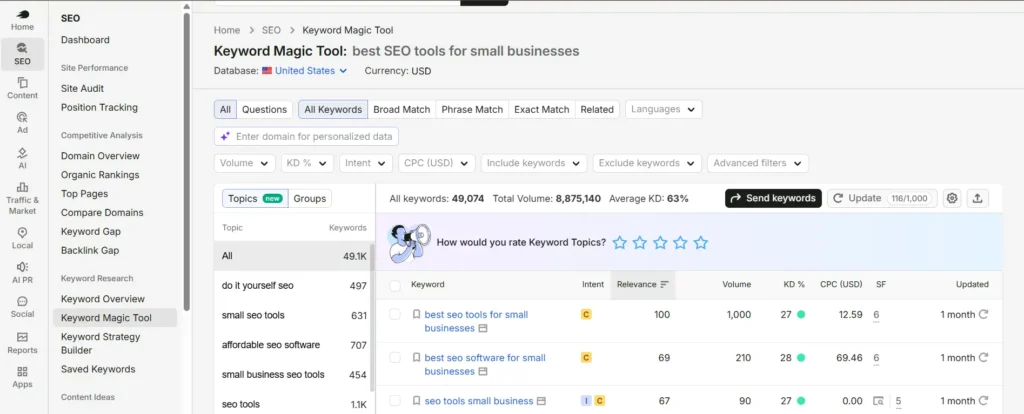
A good example is this article itself. When researching “best SEO tools for small businesses,” I didn’t choose the keyword just because it had search volume. I compared its 1,000 monthly US searches, KD of 27, commercial intent, and $12.59 CPC, then looked at the actual SERP and found that several relatively smaller websites were already competing on the first page.
That combination made the keyword much more interesting than simply looking at volume alone.
This is also why Semrush saves me a lot of time. Instead of using separate tools for every stage of keyword research, I can do much of the initial analysis in one place and then investigate the SERP more deeply before making a decision.
Is Semrush Worth It for a Small Business?
Semrush can be worth paying for if you’re actively doing SEO and need deeper keyword, competitor, and SERP research. But I wouldn’t say that every small business automatically needs a Semrush subscription.
What I consider essential is having access to a capable keyword research tool. If another platform already gives you the keyword and competitor data you need, there is little reason to pay for Semrush simply because it’s popular.
For a small business doing serious SEO, however, keyword research is one area where I find a paid tool much easier to justify. Free Google tools are extremely useful for understanding your own website, but they don’t replace the competitive and market research I use Semrush for.
If I could pay for only one SEO research platform, Semrush would be my choice because of how many parts of my research process I can handle inside it.
Don't Pay Twice for the Same SEO Research
One mistake small businesses can make is subscribing to several tools that solve essentially the same problem.
Question research is a good example. When I’m planning content, I use the Questions filter in Semrush to find question-based searches around a topic. Because that capability is already included in a platform I use for broader keyword research, I wouldn’t automatically pay for another tool just to find questions.
A dedicated People Also Ask tool can offer functionality Semrush doesn’t, so the tools aren’t identical. The point is to first ask:
What additional capability am I actually paying for?
If your current SEO software already provides the information you need, another subscription may only add another dashboard rather than better SEO.
For small businesses in particular, I think that’s a better way to build an SEO stack: pay for missing capabilities, not overlapping tools.
2. Google Search Console — Best Free SEO Tool for Google Search Visibility
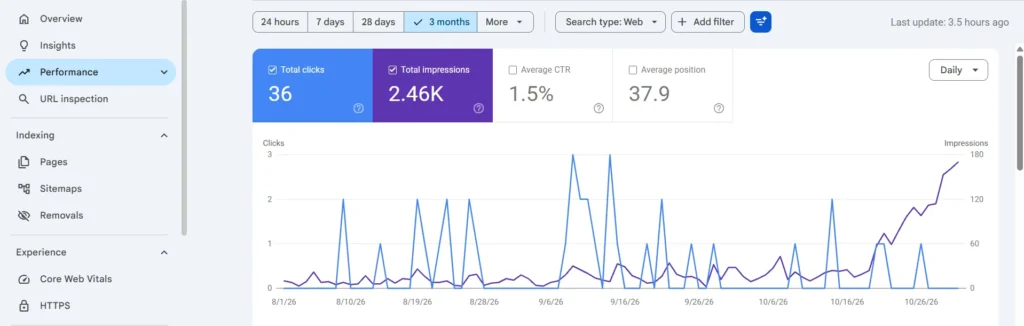
Google Search Console is one of the first tools I want connected to a website. It gives you data directly from Google about how your site appears in search, which pages are indexed, which queries generate visibility, and whether Google is encountering problems with your pages.
I use Search Console throughout the SEO process, but especially for indexing and performance monitoring. Semrush helps me decide what opportunities to target; Search Console helps me see what is actually happening with the website in Google Search.
What I Use Google Search Console For
I regularly use Search Console to:
- Check whether important pages are indexed
- Inspect individual URLs
- Monitor clicks and impressions
- See which search queries are generating visibility
- Track page performance in organic search
- Check sitemap status
- Identify indexing problems
- Request indexing after important updates
- Monitor how Google is discovering and processing pages
The URL Inspection tool is particularly useful when a page isn’t appearing in Google. Instead of guessing whether the problem is content, rankings, or indexing, I can first check whether Google actually has the URL in its index.
I’ve worked on websites where pages weren’t showing in search because of issues such as incorrect noindex settings or sitemap problems. Search Console helped confirm the indexing problem, while tools such as Screaming Frog helped investigate the technical setup behind it.
This is a good example of why I don’t rely on a single SEO tool. Search Console can tell me that Google has an indexing problem with a URL, while a technical crawler can help me investigate why.
Google Search Console vs Semrush: What's the Difference?
Search Console and Semrush overlap in some areas, but I use them for fundamentally different purposes.
| Comparison | Google Search Console | Semrush |
|---|---|---|
| Main Purpose | Monitor your own site's Google Search presence | SEO, keyword and competitor research |
| Data About Your Site | Direct Google Search data | Third-party SEO data |
| Clicks & Impressions | Yes | Uses its own datasets and estimates |
| Indexing Information | Yes | Not a replacement for GSC |
| Keyword Discovery | Queries your website already appears for | Broader keyword and search-market research |
| Competitor Research | No | Yes |
| Cost | Free | Limited free access + paid plans |
I don’t see these as competing tools. Semrush helps me research what a website should target; Search Console helps me understand how that website is actually performing in Google Search.
Is Google Search Console Enough for SEO?
No. Google Search Console is essential, but it isn’t a complete SEO toolkit.
It can tell you a lot about your site’s visibility in Google, but it doesn’t replace a technical crawler like Screaming Frog, a broader keyword and competitor research platform, website analytics, or performance-testing tools.
For a small business with no SEO budget, however, Google Search Console is one of the most valuable tools you can start using for free. Before paying for additional SEO software, I would make sure Search Console is properly connected and that you’re actually using the data it provides.
3. Screaming Frog — Best for Technical SEO Audits
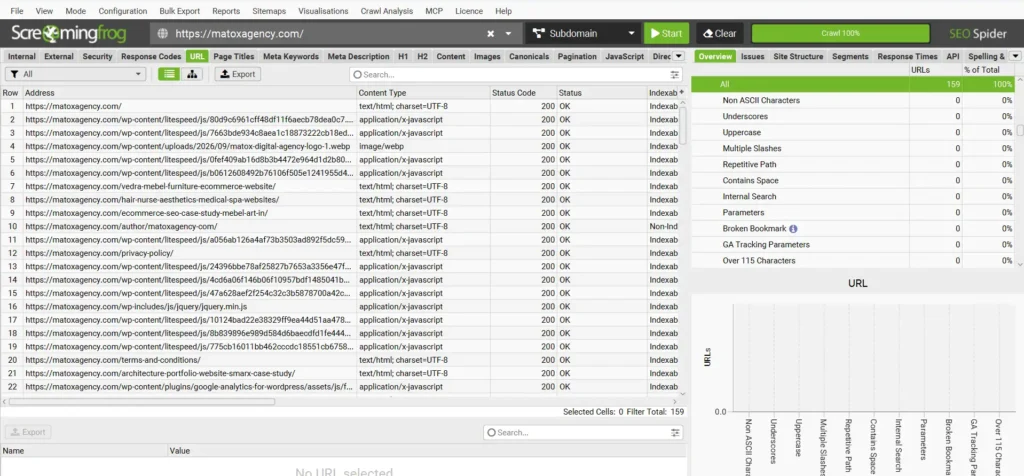
Screaming Frog is one of the most useful tools in my SEO stack when I need to understand what is happening technically across an entire website. Instead of opening pages one by one and checking them manually, I can crawl the site and identify problems much faster.
I use it alongside tools like Google Search Console rather than as a replacement for them. Search Console can alert me that Google is having trouble with a page, while Screaming Frog helps me investigate the technical setup across the website and find patterns that may be causing the problem.
What I Use Screaming Frog For
I primarily use Screaming Frog for technical SEO audits. Depending on the website and the problem I’m investigating, I use the crawl data to check things such as:
- Indexable and non-indexable URLs
noindexpages- HTTP status codes
- Broken pages and links
- Redirects
- Page titles and meta descriptions
- Canonical URLs
- Internal linking
- XML sitemap URLs
- Duplicate or missing SEO elements
- Technical issues affecting multiple pages
This is especially useful on larger websites. A technical problem that looks isolated when checking one URL can sometimes exist across dozens or hundreds of pages, and a full crawl makes those patterns much easier to spot.
I’ve used technical audits to uncover issues such as pages being unintentionally set to noindex, incorrect redirects, duplicate URLs, missing metadata, and internal-linking problems. Finding the issue is only the first step, but Screaming Frog gives me a much clearer picture of where the problem exists and how widespread it is.
Why I Consider Screaming Frog So Useful for Small Business SEO
Technical SEO can be difficult because many problems aren’t obvious from looking at the website normally.
A page can look completely fine to a visitor while still having an indexing directive, canonical, redirect, internal-linking, or metadata issue that needs attention.
That’s why Screaming Frog is one of the tools I’d prioritize when starting SEO on an existing website. Before investing heavily in new content, I want to know whether there are technical problems that could interfere with crawling, indexing, or how search engines understand the site.
For me, the combination of keyword research and technical auditing is particularly important at the beginning of an SEO project: Semrush helps establish what the website should target, while Screaming Frog helps determine whether the site’s technical foundation supports that strategy.
Is the Free Version of Screaming Frog Enough for a Small Business?
For many small websites, it can be.
The free version of Screaming Frog SEO Spider currently allows you to crawl up to 500 URLs, while the paid licence removes that crawl limit and unlocks additional features.
That means a small business website with relatively few pages can get substantial value from the free version before needing to pay.
The important thing is not whether you own the paid version. It’s whether you’re actually using the crawl data to identify and fix technical problems.
For a small business trying to build an affordable SEO tool stack, Screaming Frog is one of the strongest examples of a tool that can provide serious technical SEO value before you add another paid subscription.
4. Google Analytics (GA4) — Best for Understanding What Visitors Do on Your Website
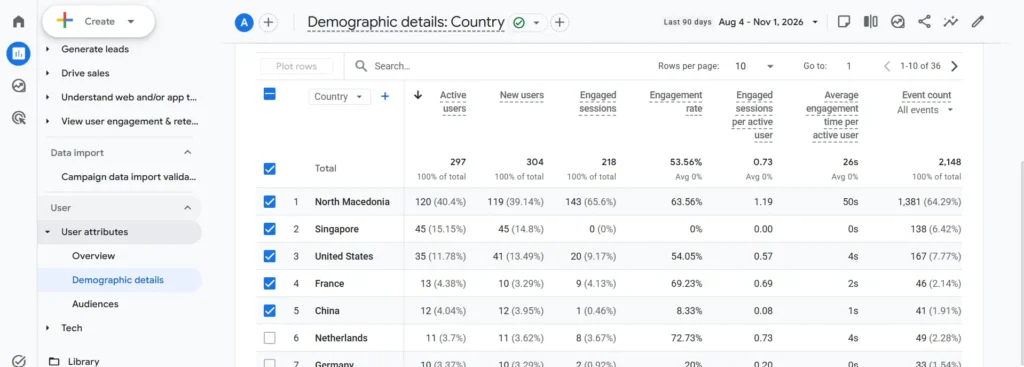
Google Analytics and Google Search Console answer different questions. Search Console helps me understand how a website performs in Google Search, while Google Analytics 4 (GA4) helps me understand what happens after visitors arrive on the website.
That distinction matters because getting organic traffic is only part of SEO. I also want to know whether people engage with the website, which pages they visit, where traffic comes from, and whether visitors complete important actions.
What I Use Google Analytics For
I use GA4 primarily to monitor website traffic and understand how users interact with a site.
Depending on the website and how its tracking is configured, that can include:
- Organic search traffic
- Traffic acquisition
- Landing pages
- User engagement
- Page views
- Events
- Conversions or other important actions
- Changes in traffic over time
This gives me a different perspective from keyword and ranking data.
A page gaining impressions or clicks in Search Console is a positive SEO signal, but that doesn’t automatically mean the page is helping the business. GA4 can help connect that traffic with what visitors actually do once they reach the website.
Do You Need Both Google Analytics and Google Search Console?
For most small-business websites, I recommend using both because they measure different parts of the search journey.
Search Console focuses on what happens in Google Search: the queries your website appears for, impressions, clicks, pages receiving search visibility, and indexing.
GA4 focuses primarily on what happens after someone reaches the website: where users came from, which pages they interact with, and which tracked actions they complete.
A simple way to think about them is:
Google Search Console → How are people finding my website through Google Search?
Google Analytics → What are people doing after they reach my website?
Neither replaces the other, and both are free to use. For a small business, I would set them up before paying for additional analytics software.
Don't Measure SEO Success by Traffic Alone
One reason I use analytics alongside SEO tools is that more traffic isn’t automatically better SEO.
A small business doesn’t necessarily benefit from attracting thousands of visitors who have little interest in its products or services. A smaller amount of relevant organic traffic that reaches important service, product, contact, or conversion-focused pages can be much more valuable.
That’s why I don’t look at traffic as an isolated number. I want to understand where the traffic came from, which pages attracted it, and what those visitors did next.
This is also where combining tools becomes more useful than relying on a single SEO dashboard: Semrush helps with the opportunity, Search Console shows Google Search performance, and GA4 helps measure what happens after the click.
5. Rank Math — Best for WordPress On-Page SEO
My main uses include:
- SEO titles and meta descriptions
- Index and
noindexsettings - Canonical URLs
- XML sitemaps
- Schema markup
- On-page SEO settings
- Social metadata
- General WordPress SEO configuration
It also gives you optimization recommendations while editing content, which can be useful for catching basic on-page elements you may have missed.
But I don’t treat its optimization score as the final measure of whether a page is properly optimized.
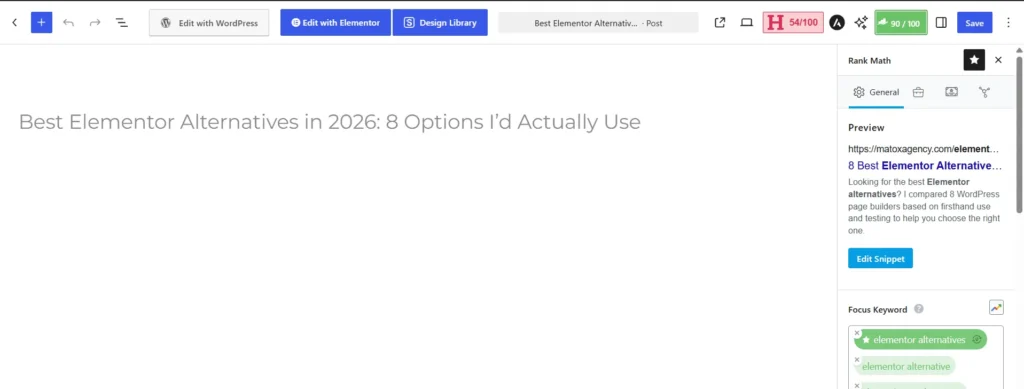
A Green SEO Score Doesn't Mean a Page Will Rank
This is an important distinction for anyone doing their own SEO with WordPress.
SEO plugins can check whether you’ve included certain elements, such as a focus keyword in the title, description, headings, URL, or content. What they can’t fully judge is whether the keyword was worth targeting in the first place or whether the page actually satisfies the search intent better than competing results.
For example, I normally do the keyword and SERP research before relying on Rank Math’s on-page recommendations.
My workflow is closer to:
Research the keyword → analyze the SERP → create the page around the right intent → implement the on-page SEO → use Rank Math as an additional check.
Not:
Get a green Rank Math score → assume the SEO is finished.
That’s why Rank Math and Semrush serve completely different purposes in my stack. Semrush helps inform the strategy; Rank Math helps me implement parts of that strategy on a WordPress website.
Does Every Small Business Need Rank Math?
No. Rank Math is specifically relevant if your website runs on WordPress.
Other content management systems and website platforms have their own SEO functionality, so there would be no reason to choose Rank Math simply because it’s on a list of the best SEO tools for small businesses.
For WordPress sites, however, having a reliable SEO plugin makes managing important settings much easier. Rank Math is the one I use in my own workflow.
The bigger lesson is the same as with the rest of the stack: use a tool because it solves a problem your website actually has, not because someone included it in a list of “must-have” SEO software.
6. PageSpeed Insights — Best Free SEO Tool for Website Performance
PageSpeed Insights is one of the first tools I use when I want to diagnose a website’s performance. It analyzes a page on both mobile and desktop and provides information about loading performance, responsiveness, visual stability, and other issues that may be affecting the user experience.
I use it during performance optimization because it doesn’t just give a website a score. The more useful part is understanding which metrics are causing problems and what is contributing to them.
What I Use PageSpeed Insights For
I primarily use PageSpeed Insights to check:
- Core Web Vitals
- Mobile and desktop performance
- Largest Contentful Paint (LCP)
- Interaction to Next Paint (INP)
- Cumulative Layout Shift (CLS)
- Render-blocking resources
- Image-related performance issues
- JavaScript and CSS impact
- Server response and loading issues
- Opportunities for improving page performance
One important distinction is that PageSpeed Insights can show both real-user field data from the Chrome User Experience Report when sufficient data is available and Lighthouse lab data from a simulated test. These aren’t the same thing, so I don’t treat every number in the report as if it represents actual visitors.
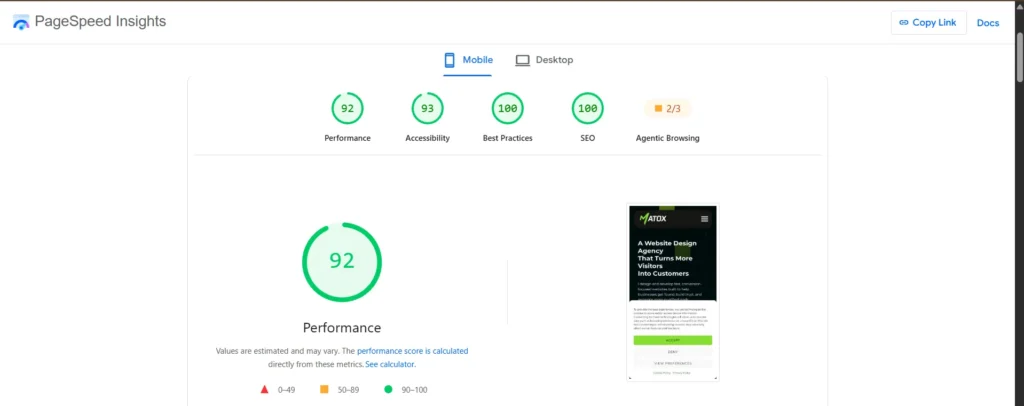
What Are Good Core Web Vitals Scores?
Google currently defines the recommended Core Web Vitals thresholds at the 75th percentile of page loads as follows: LCP within 2.5 seconds, INP within 200 milliseconds, and CLS within 0.1.
| Core Web Vital | What It Measures | Good Threshold |
|---|---|---|
| LCP | Loading performance | ≤ 2.5 seconds |
| INP | Responsiveness to user interactions | ≤ 200 ms |
| CLS | Visual stability | ≤ 0.1 |
These metrics give me a much more useful starting point than chasing a perfect performance score.
A website can have several different performance problems behind a poor result, so I use the diagnostics to understand what’s actually slowing the page down before deciding what needs to be changed.
Does PageSpeed Insights Affect SEO?
Page experience can contribute to search success, and Google says Core Web Vitals are used by its ranking systems. But Google also explicitly says that good Core Web Vitals scores don’t guarantee top rankings and that there is no single page-experience signal that determines whether a page ranks.
That’s an important distinction because I don’t optimize websites just to turn a PageSpeed score green.
The goal is to make the site genuinely faster and easier to use while fixing performance problems that can affect visitors. SEO still depends on much more than speed: content relevance, search intent, technical accessibility, links, and many other factors matter too.
For small businesses, PageSpeed Insights is particularly useful because it’s free, provides actionable diagnostics, and can identify performance problems before you pay for another optimization tool.
7. GTmetrix — Best as a Second Website Performance Testing Tool
GTmetrix is another performance tool I use when I want a deeper look at how a page loads. I don’t see it as a replacement for PageSpeed Insights, and I wouldn’t tell a small business that it needs to constantly check both tools.
Instead, I use GTmetrix as an additional diagnostic tool when I need another perspective on a website’s performance.
What I Use GTmetrix For
GTmetrix can help me investigate:
- Overall page performance
- Page loading behavior
- Largest Contentful Paint (LCP)
- Cumulative Layout Shift (CLS)
- Total Blocking Time (TBT)
- Page size
- Number of network requests
- Which resources take the longest to load
- Performance recommendations
- How individual files contribute to loading time
One of the most useful parts is the waterfall chart. Rather than only seeing that a page is slow, I can inspect the individual requests made while the page loads and identify resources that may deserve a closer look.
PageSpeed Insights vs GTmetrix: Do You Need Both?
There is overlap between the two tools, but I use them differently.
PageSpeed Insights is my primary starting point, particularly because it reports Core Web Vitals and can include real-user Chrome UX Report data when enough data is available.
GTmetrix is useful when I want to investigate the loading process in more detail, especially through its waterfall and resource-level diagnostics.
For a small-business owner doing basic performance checks, PageSpeed Insights may be all you need initially. I wouldn’t add another tool simply because it produces another performance score.
If PageSpeed Insights identifies a problem and you need to investigate what’s happening during the page load more closely, that’s when a tool like GTmetrix becomes more useful.
This is another example of the principle behind my SEO stack: two tools can overlap without needing to be used for exactly the same purpose.
8. Bing Webmaster Tools — Best Free Tool for Bing Search Visibility
Google gets most of the attention in SEO, but I still include Bing Webmaster Tools in my regular workflow. It gives me another source of search and indexing data and helps make sure a website isn’t relying entirely on Google Search Console for search-engine visibility monitoring.
It’s also free, so for me there is little reason to ignore it when setting up the SEO foundation for a website.
What I Use Bing Webmaster Tools For
I mainly use Bing Webmaster Tools to:
- Monitor how a website performs in Bing Search
- Check indexing
- Submit and monitor XML sitemaps
- Inspect URLs
- See search queries and performance data
- Identify crawl or indexing issues
- Monitor how Bing discovers the website
- Work with IndexNow where appropriate
The role is somewhat similar to Google Search Console, but the data comes from a different search ecosystem. I don’t expect the numbers in Bing Webmaster Tools to match Search Console, nor should they.
For a small business, the important point is that Google isn’t the only place where a website can be discovered through search.
Why I Use IndexNow
One feature that makes Bing Webmaster Tools particularly useful in my workflow is IndexNow.
Instead of relying only on a search engine to eventually discover that a URL has been added, updated, or deleted, IndexNow allows participating search engines to be notified about the change. It doesn’t guarantee that a page will be crawled or indexed, but it can help search engines discover URL changes faster.
I use this as part of the publishing and indexing process rather than assuming that publishing a page means search engines will immediately know about it.
That distinction is important:
Submitting or notifying ≠ guaranteed indexing.
Search engines still decide whether and when a URL should be crawled and indexed.
Do Small Businesses Need Bing Webmaster Tools?
I recommend setting it up.
It’s free, it provides additional search data, and it gives you visibility into how another search engine is processing your website.
I wouldn’t prioritize Bing Webmaster Tools instead of Google Search Console. I use both. Search Console remains essential for understanding Google Search performance, while Bing Webmaster Tools extends the monitoring and indexing workflow beyond Google.
For a small business trying to build an affordable SEO stack, this is exactly the type of tool I would set up before paying for another subscription.
9. Schema Markup Validator — Best for Checking Structured Data
Schema Markup Validator is one of the more specialized tools in my SEO stack. I don’t need to open it every day, but when I’m implementing or checking structured data, it has a very specific job: making sure the schema markup on a page is valid and identifying errors in the implementation.
Structured data helps search engines understand specific information and relationships on a page in a standardized format. Depending on the website, that could include information about an organization, local business, article, product, service, person, or other supported entities.
What I Use Schema Markup Validator For
I use it primarily to:
- Validate Schema.org structured data
- Check JSON-LD markup
- Find syntax and implementation errors
- See which schema types and properties are detected
- Check nested entities and relationships
- Verify custom schema before or after publishing
- Troubleshoot structured data when something doesn’t look right
This is particularly useful when I’ve added or modified schema manually rather than relying entirely on a WordPress plugin to generate it.
One thing I don’t recommend is assuming that schema is correct simply because a plugin generated it. If structured data matters to the page, I prefer to validate the final output that search engines can actually access.
Schema Markup Validator vs Google Rich Results Test
These two free tools are related, but they answer different questions.
Schema Markup Validator is designed for general Schema.org markup validation.
Google’s Rich Results Test checks whether structured data on a page is eligible for the rich-result types supported by Google. Google specifically recommends the Rich Results Test for checking Google rich-result eligibility.
| Tool | Best Used For |
|---|---|
| Schema Markup Validator | Validating general Schema.org markup and properties |
| Google Rich Results Test | Checking eligibility for Google-supported rich results |
I often find that distinction useful because valid schema and rich-result eligibility aren’t exactly the same thing.
A page can contain valid Schema.org markup without that schema type being eligible for a Google rich result.
Does Every Small Business Need a Schema Validator?
Not as an everyday SEO tool.
If you’re not implementing or troubleshooting structured data yourself, you probably won’t use it nearly as often as Search Console, analytics, or a keyword research platform.
But when schema is being added to your website, validation becomes important. Incorrect or incomplete implementation can defeat the purpose of adding structured data in the first place.
That’s why I keep Schema Markup Validator in my stack even though I use it less frequently: some SEO tools are valuable because you use them every day; others are valuable because they answer one technical question very well when you need them.
Which SEO Tools Does a Small Business Actually Need?
A small business does not need every SEO tool on this list. The right stack depends on the website, platform, size, SEO strategy, and how much of the work you’re handling yourself.
I separate SEO tools into three groups: must-haves, recommended tools, and tools you use when a specific need arises. This makes more sense than treating every platform as another subscription you need to add.
| SEO Tool | Priority | Why |
|---|---|---|
| Google Search Console | Must-have | Monitor Google Search performance and indexing |
| PageSpeed Insights | Must-have | Check Core Web Vitals and diagnose performance |
| Semrush or equivalent | Important | Keyword, competitor, and SERP research |
| Screaming Frog | Important | Find technical SEO problems across the website |
| Google Analytics (GA4) | Recommended | Understand traffic and what visitors do after arriving |
| Bing Webmaster Tools | Recommended | Monitor Bing visibility and indexing |
| Rank Math | WordPress sites | Manage on-page and technical SEO settings in WordPress |
| GTmetrix | Optional | Get additional performance and loading diagnostics |
| Schema Markup Validator | When needed | Validate structured data implementations |
If I were starting SEO for a small business from scratch, my first priority would be establishing what the website should target and whether its technical foundation is healthy.
That’s why Semrush and Screaming Frog play such an important role in my own workflow. I use keyword research to establish the site’s keyword and content structure, then technical crawling to identify issues that could interfere with that strategy.
After that, Search Console becomes essential for monitoring how Google is actually discovering, indexing, and displaying the website.
Start With Capabilities, Not Tool Names
Instead of asking, “Which nine SEO tools should I install?”, I think a better checklist is:
Can I research keywords and competitors?
Can I crawl and audit my website?
Can I monitor indexing and organic search performance?
Can I measure what visitors do after they arrive?
Can I diagnose website performance?
Can I implement and validate the SEO changes I make?
If the answer is yes, you already cover most of the important areas.
This also prevents unnecessary overlap. You don’t necessarily need Semrush and Ahrefs and another keyword research platform. You need reliable keyword and competitor research capabilities. Which software provides them is a separate decision.
My Priority Order for a Small Business SEO Stack
If I had to build the stack gradually, I would prioritize it like this:
1. Search and indexing: Google Search Console
2. Keyword research: Semrush or another capable research platform
3. Technical SEO: Screaming Frog
4. Performance: PageSpeed Insights
5. Measurement: Google Analytics
6. Platform optimization: Rank Math if the site uses WordPress
7. Additional search visibility: Bing Webmaster Tools
8. Additional performance diagnostics: GTmetrix
9. Structured data testing: Schema Markup Validator when needed
The goal isn’t to eventually collect all nine tools. The goal is to make sure every important part of your SEO process is covered without paying for capabilities you already have.
Have the tools but not sure what to do with the data?
MaTox Digital Agency can audit your website, identify technical and search visibility issues, and turn the findings into a clear SEO action plan.
Best Free SEO Tools for Small Businesses
You can do a surprising amount of SEO without paying for software. For a small business starting with a limited budget, I would set up the strongest free tools first and only add paid SEO software when there is a clear research or workflow limitation you need to solve.
Several tools in my regular stack are completely free, while others offer free versions that are enough for many smaller websites.
My free SEO stack would start with Google Search Console, Google Analytics, PageSpeed Insights, Bing Webmaster Tools, Schema Markup Validator, and Screaming Frog’s free version. If the website runs on WordPress, I would also add the free version of Rank Math.
Which Free SEO Tools Should You Start With?
I wouldn’t install tools just to make the stack bigger. Each one should cover a specific part of SEO:
- Google Search Console for Google indexing and organic search performance
- Google Analytics for traffic and visitor behavior
- PageSpeed Insights for performance and Core Web Vitals
- Screaming Frog for technical SEO crawling
- Bing Webmaster Tools for Bing visibility, indexing, and IndexNow
- Schema Markup Validator for structured data validation
- Rank Math for WordPress on-page SEO
Together, these tools can cover a large part of the technical, measurement, indexing, and on-page side of SEO without requiring a monthly subscription.
The biggest limitation appears when you move into deeper keyword and competitor research. That’s the area where I personally find a paid research platform like Semrush much easier to justify.
Can You Do SEO Without Paying for Tools?
Yes. A small business can absolutely start SEO without paying for software.
You can monitor Google Search performance, check indexing, analyze website traffic, crawl a smaller website, test performance, validate structured data, and manage many WordPress SEO settings using free tools.
What free tools don’t always give you as efficiently is the broader market picture.
For example, Search Console can show the queries your website is already receiving impressions for, but when I’m planning a new website structure or content strategy, I also want to research keywords the website doesn’t rank for yet, search demand, competitors, SERPs, related searches, and new opportunities.
That’s where a paid keyword research platform becomes much more valuable to me.
When Should You Start Paying for SEO Software?
I wouldn’t upgrade simply because a paid tool has more features.
I would pay when the free stack creates a real limitation in the work you’re trying to do.
For example:
You need deeper keyword research → consider a paid research platform.
You need stronger competitor analysis → a platform such as Semrush becomes more useful.
Your website exceeds the limits of a free crawler → consider upgrading your technical SEO tool.
You need a feature your existing stack genuinely doesn’t provide → then another subscription may make sense.
This is also why I don’t think the most affordable SEO tools are necessarily the ones with the lowest monthly price. An affordable SEO stack is one that gives you the capabilities you need without making you pay multiple times for the same job.
If I Could Pay for Only One SEO Tool, Which Would I Choose?
If I could pay for only one SEO tool for a small business, I would choose Semrush.
The main reason is coverage. Most of the other important parts of my SEO workflow can already be handled surprisingly well with free tools.
Google Search Console covers search performance and indexing. Google Analytics covers traffic and visitor behavior. PageSpeed Insights handles Core Web Vitals and performance testing. Bing Webmaster Tools covers Bing, and the free version of Screaming Frog can handle technical crawling for many smaller websites.
What I would find much harder to replace is the depth of keyword, competitor, and SERP research I get from Semrush.
Why Semrush Would Be My One Paid SEO Tool
When I’m researching a website or planning SEO content, I use Semrush to investigate:
- Keyword search volume
- Keyword difficulty
- Search intent
- CPC and commercial value
- Related keywords and variations
- Question-based searches
- Competitor keywords
- Keyword gaps
- Ranking pages
- Backlinks and competitor authority
- The actual SERP for a keyword
That combination helps me decide not only what people search for, but whether a keyword is actually worth targeting.
For example, before writing this article, I didn’t choose “best SEO tools for small businesses” simply because it sounded relevant. I checked its search demand, difficulty, intent, CPC, ranking competitors, and the websites currently appearing on the first page.
That’s the kind of research I want before investing time into creating a page.
Does That Mean Semrush Is the Best Choice for Every Small Business?
No.
A small business doesn’t specifically need Semrush. It needs a capable keyword and competitor research platform if SEO is going to be an important acquisition channel.
There are other established SEO platforms that cover many of the same areas. I haven’t personally used every major alternative, so I wouldn’t rank them based on experience I don’t have.
For my own workflow, however, Semrush is the paid platform I use and the one I would keep if I had to reduce my SEO stack to a single paid subscription.
Everything else would start with the strongest free tools available.
If your SEO budget is limited, I would rather combine one capable paid research platform with several excellent free tools than pay for multiple platforms with heavily overlapping features.
My Actual SEO Tool Stack and Workflow
I don’t use all nine SEO tools at the same time. Each one enters my workflow at a different stage depending on what I’m trying to research, diagnose, implement, or measure.
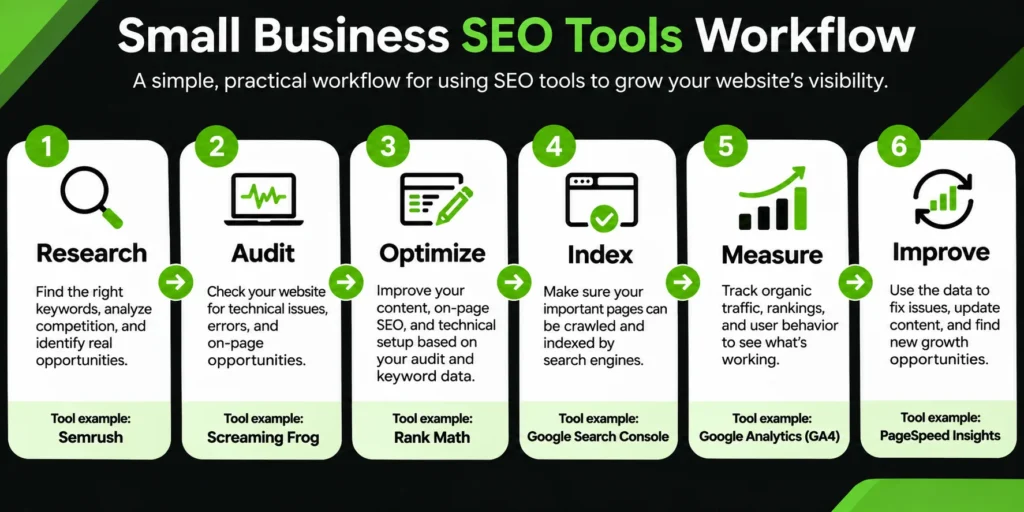
For a typical SEO project, my process looks something like this:
| SEO Stage | Tool I Use | What I'm Doing |
|---|---|---|
| 1. Research | Semrush | Find keywords, analyze intent, competitors, SERPs, questions, and opportunities |
| 2. Technical Audit | Screaming Frog | Crawl the website and identify technical SEO problems |
| 3. Optimize | Rank Math | Implement and check on-page SEO settings on WordPress |
| 4. Performance | PageSpeed Insights + GTmetrix | Diagnose Core Web Vitals, loading issues, and individual resources |
| 5. Validate | Schema Markup Validator | Check structured data after implementation |
| 6. Index | Google Search Console + Bing Webmaster Tools | Check indexing, submit sitemaps, inspect URLs, and monitor search visibility |
| 7. Measure | GSC + GA4 | Monitor organic search performance, traffic, landing pages, and visitor behavior |
| 8. Improve | Semrush + GSC + Screaming Frog | Find new opportunities and problems, then repeat the process |
The important part is that this is a workflow, not a collection of dashboards.
I might start in Semrush while deciding which keywords a service page should target, move to Screaming Frog to understand the site’s technical condition, make the changes, and then use Search Console and analytics to see what happens afterward.
Research → Audit → Optimize → Index → Measure → Improve
If I had to simplify my entire SEO tool stack into one process, it would be:
Research → Audit → Optimize → Index → Measure → Improve
Then repeat.
SEO isn’t finished when a page is published.
After publishing or updating important pages, I check whether search engines can discover and index them properly. Once they begin collecting impressions, clicks, rankings, and traffic, that data can influence what I improve next.
This is where combining tools becomes more useful than looking at any single dashboard in isolation.
For example, Semrush might help me discover an opportunity, Screaming Frog might reveal a technical problem affecting the site, Search Console can show how the page performs in Google Search, and GA4 can help me understand what happens after those visitors reach the website.
Each tool answers a different question.
The SEO Metrics I Check — and Where I Check Them
I also don’t expect every SEO platform to be the source of truth for every metric.
| What I Want to Know | Tool I Check |
|---|---|
| Organic clicks from Google | Google Search Console |
| Search impressions | Google Search Console |
| Queries and ranking pages | Google Search Console |
| Website traffic and acquisition | Google Analytics |
| Visitor actions and conversions | Google Analytics |
| Keyword opportunities | Semrush |
| Competitor and SERP data | Semrush |
| Technical SEO problems | Screaming Frog |
| Core Web Vitals | PageSpeed Insights |
| Bing search visibility | Bing Webmaster Tools |
This is another reason I don’t think small businesses should search for one platform that supposedly “does everything.”
SEO tools give you data. They don’t make the decision for you. The real value comes from knowing which data matters, which tool to trust for it, and what action to take next.
Don't Pay for SEO Tools That Do the Same Job
One of the easiest ways to make an SEO stack unnecessarily expensive is to subscribe to several tools that solve essentially the same problem.
This doesn’t mean two tools can never overlap. Many SEO platforms share features. The question I ask is: Does the second tool give me something valuable that I can’t already get from the tools I’m using?
If the answer is no, I probably don’t need another subscription.
A Real Example: Question Research
A good example is question-based keyword research.
There are dedicated tools built specifically around finding questions people search for. AlsoAsked, for example, focuses on mapping relationships between Google’s People Also Ask questions.
That can be useful for certain workflows, but for the way I currently research content, I can already find question-based keyword opportunities inside Semrush.
When I’m researching a topic, I can use Semrush’s question filters and related keyword data to find searches that can become H2s, H3s, FAQs, or supporting sections.
So before paying for another question-research tool, I would ask:
What additional information will it give me that changes what I actually do?
If my existing platform already gives me what I need, adding another subscription doesn’t automatically improve my research.
Watch for Overlap Across Your Entire SEO Stack
The same principle applies beyond question research.
You can easily end up paying for:
- Multiple all-in-one SEO platforms with similar keyword databases
- Several rank-tracking tools
- Multiple backlink analysis platforms
- Several technical auditing tools
- Different content tools covering similar keyword research
- Multiple performance-testing services
Sometimes there is a legitimate reason to use two tools in the same category. I use both PageSpeed Insights and GTmetrix, for example, because I use them differently and GTmetrix can provide additional diagnostics when I’m investigating performance.
That’s intentional overlap.
Paying for several platforms simply because each one has an SEO dashboard is different.
Buy Capabilities, Not Software
Before adding another SEO tool, I would write down the specific problem first.
“I need better competitor keyword data” is a reason to look for a tool.
“Everyone recommends this SEO platform” isn’t.
The same applies when evaluating your existing subscriptions. If two paid tools consistently provide the same information and one of them isn’t changing your decisions, that subscription may not be adding much value.
For a small business, I think this is a much better way to build an affordable SEO stack:
Don’t pay for more SEO tools. Pay for capabilities you’re actually missing.
Free vs Paid SEO Tools: When Should a Small Business Upgrade?
Free SEO tools are enough to cover a large part of the fundamentals. I wouldn’t recommend paying for software simply because a business has started doing SEO.
The better time to upgrade is when a free tool is limiting the research, scale, or analysis you actually need to do.
| Situation | Free Tools May Be Enough | Consider Paid Tools When |
|---|---|---|
| Keyword Research | You're working with existing GSC data and basic keyword ideas | You need deeper keyword, competitor, intent, and SERP research |
| Technical SEO | You have a smaller website within the limits of your crawler | You have a larger website or need more advanced crawling features |
| Search Performance | GSC and Bing Webmaster Tools provide the search data you need | You need competitor visibility, broader keyword tracking, or market research |
| Analytics | GA4 provides the traffic and conversion data you need | You have more advanced analytics or reporting requirements |
| Performance | PageSpeed Insights and GTmetrix provide enough diagnostic information | You need continuous monitoring or more specialized performance tooling |
| On-Page SEO | Your CMS or SEO plugin covers the implementation you need | You need functionality unavailable in your current setup |
| Structured Data | Free validation tools are usually sufficient | Usually no paid tool is necessary just for validation |
When Free SEO Tools Are Enough
For a small local business or relatively small website, a free stack can take you much further than many people expect.
You can monitor indexing with Search Console, analyze traffic with GA4, audit a smaller site with Screaming Frog’s free version, test Core Web Vitals with PageSpeed Insights, monitor Bing through Bing Webmaster Tools, and validate structured data without paying for each of those capabilities.
If those tools provide everything you need to make the next SEO decision, there’s no reason to upgrade simply for the sake of having a paid stack.
When Paying for an SEO Tool Makes Sense
The value of paid SEO software becomes clearer when you’re trying to answer questions that your free tools can’t answer efficiently.
For example:
- Which keywords are my competitors ranking for that I’m missing?
- How difficult is a new keyword likely to be?
- What does the SERP look like before I create a page?
- Which websites compete with me organically?
- What new topics should I target?
- How does my visibility compare with competitors?
Those are some of the reasons I pay for Semrush.
The subscription isn’t valuable simply because it unlocks more reports. It’s valuable when those reports help me make better SEO decisions faster.
How Much Should a Small Business Spend on SEO Tools?
There isn’t one monthly amount that makes sense for every small business.
A business doing occasional SEO on a small website may be able to work primarily with free tools. A company actively publishing content, building landing pages, researching competitors, and trying to grow organic search as an acquisition channel may get considerably more value from paid research software.
I would decide based on the capability you need and how frequently you’ll use it, rather than setting an arbitrary software budget.
Start free where you can. Pay when you can identify exactly what the upgrade will help you do better.
The goal isn’t to build the biggest SEO stack. It’s to build the smallest stack that gives you enough information to make good decisions.
What SEO Tools Can't Do for You
SEO tools can collect enormous amounts of data, but they can’t replace the decisions you make with that data.
A tool can show me that a keyword has search volume, a relatively low difficulty score, and commercial intent. That doesn’t automatically mean I should target it.
I still need to look at the actual search results and ask:
- Does the search intent match the page I want to create?
- What types of pages are currently ranking?
- Are those results realistic competitors for this website?
- Does the keyword fit the business and its services?
- Could ranking for it attract the right potential customers?
- Do we have something genuinely useful to contribute?
This is why I treat metrics such as keyword difficulty, SEO scores, performance scores, and audit percentages as inputs rather than final decisions.
SEO Scores Aren't the Strategy
Many SEO tools simplify complex information into scores.
Semrush has keyword difficulty metrics. Rank Math provides optimization scores. PageSpeed Insights produces performance scores. Technical auditing tools can report hundreds of warnings and issues.
Those numbers are useful for identifying where to investigate, but reaching a perfect score isn’t the goal.
A page with a perfect on-page SEO score can still target the wrong search intent. A website with excellent performance can still have weak content. A keyword labeled “easy” can still have a SERP that doesn’t make sense for your business.
The score tells you where to look. You still have to decide what matters.
Tools Also Don't Replace Firsthand Knowledge
This becomes even more important when creating content.
Keyword research can tell you what people are searching for. Competitor analysis can show you what already ranks. Question research can reveal what people want answered.
But none of those automatically give you the experience, examples, opinions, original data, screenshots, or expertise that make a page genuinely useful.
This article is a good example.
The tool list isn’t based only on which SEO platforms have the most features. It’s based on the tools I actually use, where they fit into my workflow, which ones I would prioritize, and where I think small businesses can avoid unnecessary subscriptions.
That’s information an SEO tool can’t generate from a keyword database.
Use SEO Tools to Make Better Decisions — Not to Make Decisions for You
I think the healthiest way to use SEO software is to treat it as evidence.
Use the data to understand the search landscape. Use crawlers to uncover problems. Use Search Console and analytics to see what actually happened. Then combine that information with your understanding of the business, customers, website, and search intent.
SEO tools give you data. They don’t make the decision for you.
How to Choose the Right SEO Tools for Your Small Business
The best SEO tools for your business depend on what you’re trying to accomplish, not how many features a platform offers.
Before subscribing to anything, I would start by identifying the SEO tasks you actually need help with.
For example, do you need to:
- Find keywords your potential customers are searching for?
- Research competitors and analyze search results?
- Find technical problems on your website?
- Monitor whether your pages are indexed?
- Measure organic traffic and conversions?
- Improve website speed and Core Web Vitals?
- Manage on-page SEO?
- Validate structured data?
Once you know the problem, choosing the tool becomes much easier.
1. Start With the SEO Problem
Don’t start by comparing software.
Start with something specific, such as:
“I don’t know which keywords my service pages should target.”
Now you know you need keyword and SERP research capabilities.
Or:
“Google isn’t indexing some of my pages.”
That points toward Search Console and potentially a technical crawl with Screaming Frog.
This approach prevents you from buying a large SEO platform when a free specialized tool could solve the problem.
2. Use the Free Tools First
I would set up the essential free tools before adding paid software.
For most small businesses, that means starting with Google Search Console, Google Analytics, PageSpeed Insights, and Bing Webmaster Tools, then adding tools such as Screaming Frog, Rank Math for WordPress, and schema validation when relevant.
This gives you a strong foundation before you start paying for additional capabilities.
3. Look for Gaps in Your Existing Stack
Before subscribing to another platform, check whether one of your existing tools already does what you need.
This is especially important with all-in-one SEO platforms because there can be considerable overlap in keyword research, competitor analysis, backlinks, auditing, and rank tracking.
Ask one simple question:
What can this new tool help me do that I can’t already do effectively?
If there isn’t a clear answer, you may not need it.
4. Consider the Size and Complexity of Your Website
A five-page local business website doesn’t have the same SEO requirements as an e-commerce store with thousands of URLs.
A smaller website may be perfectly manageable with free versions of technical and performance tools. As the site grows, paid crawling, tracking, reporting, or research capabilities can become more useful.
Your SEO stack should grow because your requirements have changed — not because you’ve found another list of recommended tools.
5. Choose Tools You'll Actually Use
A powerful SEO platform isn’t valuable if you rarely open it or don’t know what to do with its data.
I’d rather have a smaller stack where every tool has a clear purpose:
Research → Audit → Optimize → Index → Measure → Improve.
That covers the workflow I care about without turning SEO into managing software subscriptions.
The best SEO tool isn’t the one with the most features. It’s the one that solves the SEO problem you actually have.
FAQs About SEO Tools for Small Businesses
What is the best SEO tool for a small business?
There isn’t one SEO tool that’s best for every task. If I could choose only one paid SEO tool, I would choose Semrush because I use it for keyword research, competitor analysis, search intent, SERP research, and discovering new opportunities.
However, I would combine it with free tools such as Google Search Console, Google Analytics, PageSpeed Insights, and Bing Webmaster Tools rather than expecting one platform to handle everything.
What are the best free SEO tools for small businesses?
Some of the best free SEO tools for small businesses are Google Search Console, Google Analytics, PageSpeed Insights, Bing Webmaster Tools, Schema Markup Validator, and the free version of Screaming Frog.
For WordPress websites, the free version of Rank Math can also cover many important on-page and technical SEO settings.
Do small businesses need paid SEO tools?
No. You can handle a significant amount of SEO with free tools, particularly indexing, analytics, website performance, technical auditing, and structured data validation.
Paid software becomes more valuable when you need deeper keyword research, competitor analysis, SERP research, rank tracking, or other capabilities that your free stack doesn’t provide efficiently.
Is Google Search Console enough for SEO?
Google Search Console is essential, but I wouldn’t use it as my only SEO tool.
It can show you how your website performs in Google Search, including clicks, impressions, queries, pages, and indexing information. However, it isn’t a replacement for dedicated keyword research, competitor analysis, technical crawling, analytics, or performance testing.
Do I need both Google Analytics and Google Search Console?
I recommend using both because they answer different questions.
Google Search Console helps you understand what happens in Google Search before someone reaches your website — including queries, impressions, clicks, and indexing.
Google Analytics helps you understand what happens after visitors arrive — including traffic acquisition, landing-page activity, events, and conversions when properly configured.
Used together, they give you a much more complete picture of SEO performance.
Final Thoughts: You Don't Need More SEO Tools — You Need the Right Stack
The best SEO tools for small businesses aren’t necessarily the platforms with the longest feature lists. They’re the tools that help you solve the SEO problems you actually have.
For my own SEO work, that means using Semrush for research, Screaming Frog for technical audits, Google Search Console and Bing Webmaster Tools for search visibility and indexing, GA4 for measurement, PageSpeed Insights and GTmetrix for performance, Rank Math for WordPress SEO, and Schema Markup Validator when I need to validate structured data.
But I wouldn’t tell a small business to immediately start using all nine.
Start with the free tools. Identify what they allow you to do and, more importantly, where they start limiting you. If you need deeper keyword and competitor research, that’s when a paid platform becomes easier to justify.
The same principle applies as your SEO strategy grows. Don’t add software because another tool appears on a “must-have” list. Add it because you can identify a specific capability your current stack is missing.
I’ve found that a smaller stack also makes the SEO process much clearer:
Research → Audit → Optimize → Index → Measure → Improve.
You don’t need ten different platforms giving you slightly different versions of the same data. You need reliable information at each stage and the experience to know what to do with it.
Most small businesses don’t need a huge SEO stack. A few tools used properly are more valuable than ten subscriptions you barely open.
And if you’re building your stack today, start with the fundamentals: understand what your customers are searching for, make sure your website is technically healthy, and set up the tools that show you what happens next.
Want to grow your business through organic search?
We help businesses improve their technical SEO, search visibility, content strategy, and website performance with a strategy built around real search data.

About the Author
Makedonka Tochevska
Makedonka Tochevska is the founder of MaTox Digital Agency and a web designer and front-end developer. She works on website design and redesign projects with a focus on WordPress development, user experience, website performance, and SEO implementation.
Her work includes planning and building business websites, construction and architecture websites, improving existing websites, and handling the technical and SEO details that need to be considered when a website changes.