
Website Redesign Checklist: What to Check Before, During & After Launch
By Makedonka Tochevska · Last Update October 2026
Before redesigning your website, document what you already have. Check your traffic, rankings, important URLs, content, conversions, functionality, and integrations before making major changes.
Then:
Audit before you design. Know what’s working before deciding what to replace.
Avoid changing URLs unnecessarily. If a URL does need to change, plan the correct redirect before launch.
Protect more than SEO. Forms, analytics, booking systems, ecommerce functionality, integrations, and conversion paths can all be affected by a redesign.
Test the new website before it goes live. Check mobile, links, forms, redirects, tracking, indexation, performance, and business-critical functionality.
Don’t consider launch the finish line. Crawl the live website again and monitor Search Console, traffic, rankings, leads, and conversions for problems after launch.
Redesigning a website is easy to treat as a fresh start: new design, new pages, better navigation, better content. But starting from scratch without looking closely at the website you already have can create problems you didn’t have before.
Your current site may already have pages bringing in organic traffic, URLs with backlinks, forms generating leads, tracking that your business relies on, or integrations working quietly in the background. A redesign can improve all of that, but it can also accidentally break it.
That’s why I don’t think a website redesign should start with the new design. It should start with understanding what already works, what doesn’t, and what needs to be protected.
This website redesign checklist covers the full process: from auditing your existing site and planning the redesign to SEO, development, pre-launch testing, and the checks you should make after the new website goes live.
TABLE OF CONTENTS
- Website Redesign Checklist: Quick Version
- Audit Your Existing Website Before Redesigning It
- Define Your Website Redesign Goals and Strategy
- Build Your Website Redesign Plan
- Website Redesign SEO Checklist: How to Redesign Without Losing SEO
- What to Check During Design and Development
- Website Redesign Pre-Launch Checklist
- Your Website Redesign Isn’t Finished at Launch
- What This Looks Like on a Real Website Redesign
- Website Redesign FAQs
Website Redesign Checklist: Quick Version
A website redesign involves more than updating how your site looks. Use this checklist to make sure you protect what already works, plan the new site properly, and catch problems before and after launch.
Before the redesign
- Define why you're redesigning the website and what needs to improve.
- Set measurable goals for the new website.
- Record your current traffic, rankings, leads, and conversions.
- Crawl your existing website and create a list of current URLs.
- Identify pages bringing in organic traffic, conversions, or backlinks.
- Review existing content and decide what should stay, change, merge, or be removed.
- Make a list of forms, booking systems, ecommerce features, tracking, and other integrations the site relies on.
Plan the redesign
- Define the requirements for the new website.
- Plan the new sitemap and navigation.
- Decide which existing URLs can stay the same.
- Map changed or removed URLs to the most relevant new pages.
- Plan which content needs to be migrated, rewritten, or created.
- Establish the redesign timeline and who is responsible for each part.
During design and development
- Make important pages and actions easy for visitors to find.
- Check the design and functionality across mobile, tablet, and desktop.
- Build with accessibility in mind.
- Keep page speed and Core Web Vitals in consideration during development.
- Rebuild and test forms, booking systems, ecommerce functionality, and other integrations.
- Preserve or improve important on-page SEO elements.
- Reconnect analytics, conversion tracking, and consent tools correctly.
Before launch
- Test navigation, buttons, and internal links.
- Submit and test every important form.
- Test booking, checkout, search, filters, and other business-critical functionality.
- Check the website across major browsers and screen sizes.
- Test all planned redirects.
- Review page titles, meta descriptions, headings, and image alt text.
- Check canonical URLs.
- Validate relevant structured data.
- Make sure important pages aren't accidentally set to noindex.
- Check robots.txt and the XML sitemap.
- Confirm analytics and conversion tracking are working.
- Crawl the new website for errors.
- Create a backup before launch.
After launch
- Crawl the live website again.
- Look for unexpected 404 errors and broken links.
- Check redirects for errors or unnecessary redirect chains.
- Confirm analytics is collecting data.
- Test forms and conversions again on the live website.
- Check Google Search Console for crawling or indexing problems.
- Make sure the correct XML sitemap is available to search engines.
- Monitor important organic traffic and rankings.
- Monitor leads, sales, bookings, or other important conversions.
- Fix problems based on what the post-launch data shows.
Don’t treat every item as equally important for every website. A five-page local business site and a large ecommerce store have very different redesign requirements. The point of the checklist is to make sure you deliberately assess each area instead of discovering after launch that something important was forgotten.
Audit Your Existing Website Before Redesigning It
Before deciding what the new website should look like, take a close look at the one you already have.
One of the easiest mistakes to make during a redesign is to focus so much on what needs to change that you overlook what’s already working. A page might look outdated but still bring in qualified traffic. An old URL might have valuable backlinks. A form or integration you barely think about might be responsible for a large part of your enquiries.
The goal of a website redesign audit is to create a baseline. You want to know what the current website is doing before you start changing it, so you can make informed decisions instead of guessing.
Benchmark Your Traffic, Rankings, and Conversions
Start by recording how the website performs before the redesign.
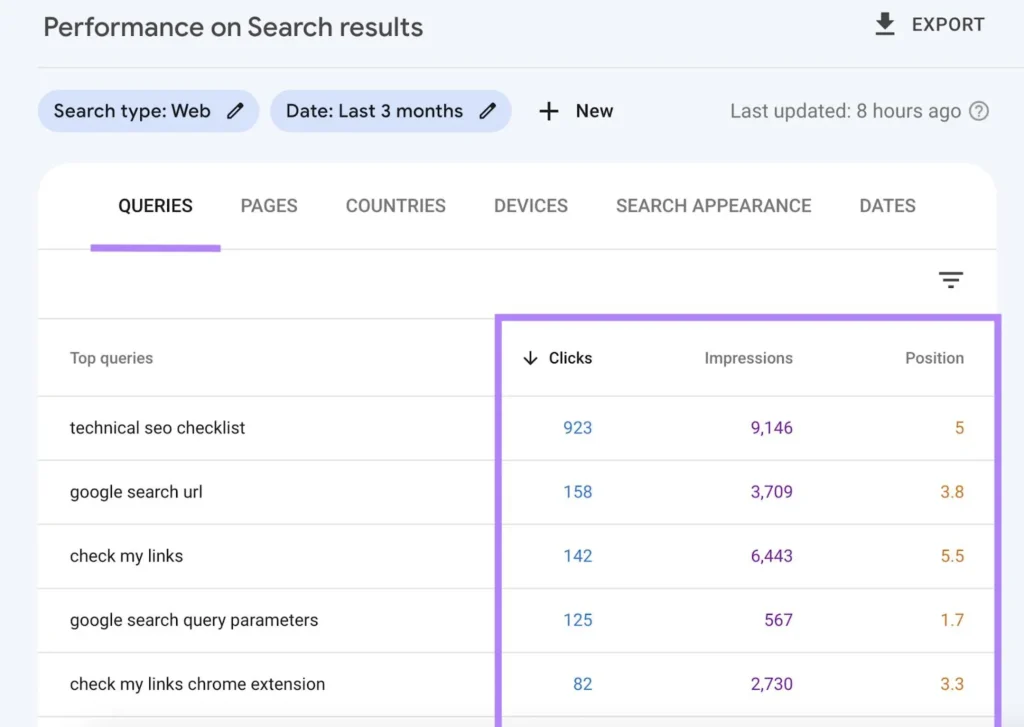
In Google Search Console, look at which pages receive the most organic clicks and impressions, the queries bringing visitors to the site, and any pages that already rank well for important searches.
In Google Analytics, look beyond total traffic. Pay attention to the actions that actually matter to the business, such as form submissions, bookings, purchases, phone clicks, or other conversions you’re tracking.
At minimum, I would record:
- top organic landing pages
- important search queries and current rankings
- organic clicks and impressions
- traffic to key service or product pages
- leads, bookings, purchases, or other primary conversions
- current conversion rate, if reliable tracking is already in place
Save this information before launch. You’ll need the baseline later to determine whether the redesign actually improved the website and to spot significant drops after migration.
Crawl the Existing Website
Analytics tells you how people use the website. A crawl tells you much more about how the website itself is structured.
For redesign projects, I like to have a record of the existing URLs before development gets too far. A tool such as Screaming Frog can help you identify:
- indexable URLs
- redirects and existing 404s
- page titles and meta descriptions
- H1 headings
- canonical URLs
- indexability directives
- internal links
- images and other site elements
This gives you something concrete to compare against later instead of trying to remember how the old website was configured after it has already been replaced.
It also helps uncover pages that are easy to miss when you’re building the new sitemap. A page might not appear in the main navigation but could still receive organic traffic or have links pointing to it.
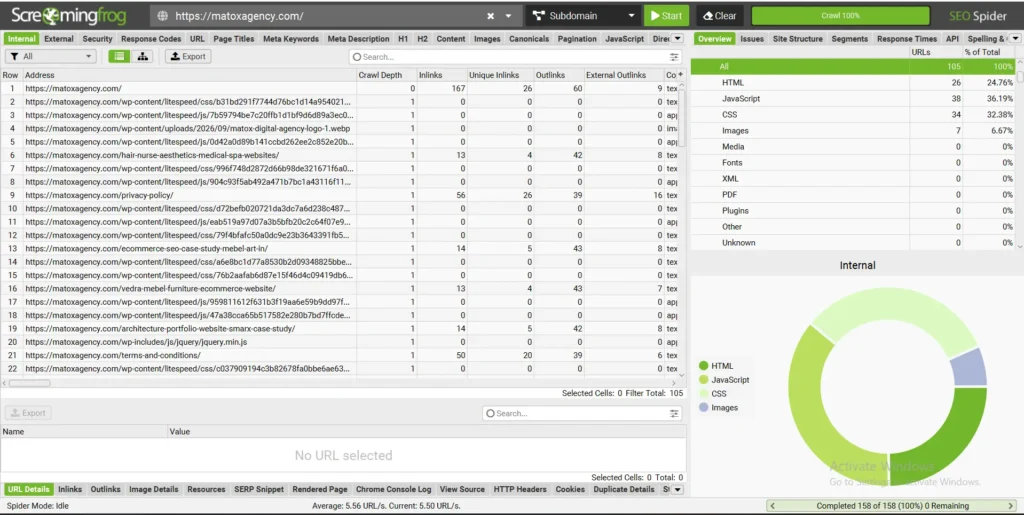
When I audit a website with Screaming Frog, I start by reviewing the URL inventory to understand the site’s structure and how its pages are connected. I check crawl depth, internal links, HTTP status codes, and indexability to identify potential SEO issues, including broken pages, redirect chains, orphan pages, and URLs that shouldn’t be indexed.
Identify the Pages You Can't Afford to Lose
Don’t decide which pages survive the redesign based only on whether you like them.
Before removing, merging, or substantially changing a page, check whether it already has value.
That value could come from:
Organic traffic and rankings. A page that consistently attracts search traffic deserves careful consideration before its content or URL changes.
Conversions. Some pages may not generate much traffic but play an important role in turning visitors into leads or customers.
Backlinks. If other websites link to a URL, deleting it without a proper plan can throw away authority the site has already earned.
Internal importance. A page may connect important parts of the website or help visitors move toward a conversion.
This doesn’t mean every existing page needs to survive. A redesign is often a good opportunity to consolidate thin content, remove obsolete pages, and improve weak ones. The important part is that those decisions are intentional.
Later, when we build the new sitemap and redirect map, this audit becomes the evidence behind those decisions.
Inventory Functionality, Not Just Pages
This is a step I wouldn’t skip.
A list of URLs tells you what content exists. It doesn’t tell you everything the website does.
Before a redesign, make a separate inventory of functionality and third-party integrations, including anything the business depends on day to day.
Depending on the website, that might include:
- contact and lead-generation forms
- booking or appointment systems
- ecommerce and checkout functionality
- payment integrations
- newsletter signup forms
- CRM connections
- analytics and conversion tracking
- advertising pixels
- cookie consent tools
- site search and product filters
- maps and location tools
- live chat
- third-party embeds
- membership or login functionality
- automations triggered by website actions
And don’t just write down that something exists. Record how it’s supposed to work.
For example, a contact form isn’t simply “a form.” Where does the submission go? Does it trigger an automated email? Is it recorded somewhere else? Does completing it count as a conversion in analytics?
These are exactly the details that can disappear during a redesign because they’re less visible than the pages themselves.
By the end of your audit, you should have a clear picture of what the current website has, what is already valuable, what isn’t working, and what the new website needs to preserve or improve.
That gives you a much better starting point for the next stage: defining your website redesign goals and strategy.
Define Your Website Redesign Goals and Strategy
Once you understand what the existing website is doing, the next step is deciding what the redesign actually needs to accomplish.
“Make the website look more modern” can be part of the goal, but it isn’t enough to guide a redesign. A new visual style won’t fix confusing navigation, poor mobile usability, slow pages, weak conversion paths, or content that doesn’t answer what potential customers are looking for.
Your website redesign strategy should connect the changes you’re making to specific problems you found during the audit.
Decide What the Redesign Actually Needs to Improve
Start with the problems rather than the solutions.
For example, instead of deciding immediately that you need a completely different homepage, first ask why the current homepage isn’t working.
Maybe visitors aren’t reaching important service pages. Maybe the main call to action gets very few clicks. Maybe the site is difficult to use on mobile. Or perhaps the website generates traffic but very few enquiries.
Your website redesign goals could include:
- increasing qualified enquiries or bookings
- making important services or products easier to find
- improving mobile usability
- simplifying navigation
- improving website speed and Core Web Vitals
- increasing conversions from existing traffic
- improving organic search visibility
- making the website easier for your team to manage
- presenting the business, services, or products more clearly
Whenever possible, connect those goals to something you can measure.
For example:
Too vague: “Improve the website experience.”
Better: “Make it easier for visitors to find our main services and reach the booking page.”
Even better: “Increase the percentage of visitors who reach the booking page and complete a booking.”
Not every goal needs a perfect KPI, but you should be able to explain what would make the redesign successful beyond simply preferring the new design.
Decide What Should Stay, Change, or Be Removed
A redesign doesn’t mean everything on the existing website needs to be replaced.
After the audit, go through the important pages, content, functionality, and integrations and give each one a clear decision:
Keep it. It’s working and doesn’t need a significant change.
Improve it. It has value, but the content, design, usability, or performance could be better.
Merge it. Multiple pages cover similar information and would be more useful as one stronger resource.
Remove it. It’s outdated, unnecessary, or no longer serves the business or its visitors.
Replace it. The purpose still matters, but the existing solution isn’t suitable for the new website.
A simple decision table can make this much easier to manage:
| Current Element | Decision | Why |
|---|---|---|
| High-performing service page | Keep and improve | Already generates relevant organic traffic |
| Confusing main navigation | Replace | Important pages are difficult to find |
| Two overlapping pages | Merge | They serve essentially the same purpose |
| Booking integration | Keep/rebuild | Essential to how customers book |
| Outdated campaign page | Remove or redirect | Campaign is no longer active |
The important distinction is that “remove” doesn’t necessarily mean “delete the URL and forget about it.” If a page has traffic, backlinks, rankings, or a relevant replacement, its URL needs to be considered when we create the redirect plan later.
Prioritize the Changes That Matter Most
Redesign projects can grow quickly.
Once you start looking closely at a website, it’s easy to create a long list of things you’d like to change. Treating every idea as equally important can make the project larger, slower, and harder to manage.
I prefer separating requirements into three groups:
1. Must Have
Changes the new website genuinely needs to launch successfully.
For example, fixing broken mobile layouts, rebuilding an important booking flow, improving confusing navigation, or preserving critical SEO elements.
2. Should Have
Improvements that would meaningfully strengthen the website but aren’t necessarily launch blockers.
3. Nice to Have
Ideas worth considering if the budget and timeline allow, but that shouldn’t delay the project or distract from more important problems.
This also helps prevent a common redesign problem: adding features simply because they sound good rather than because users or the business actually need them.
By this point, you should know why you’re redesigning the website, what success should look like, what needs to change, and what needs to be protected.
That gives us what we need for the next stage:
Build Your Website Redesign Plan
Once you’ve defined what the redesign needs to accomplish, turn those goals into a practical plan before design and development begin.
This is where you decide how the new website will be structured, what it needs to do, what content needs to move, and how the project will progress. Making these decisions early can prevent expensive changes later, when pages have already been designed or developed.
Define the Website Requirements
Start by documenting what the new website actually needs.
Some requirements will come directly from the audit. If the existing website has a booking system that customers rely on, for example, the new site needs to support that functionality. If the current site is difficult for the team to update, easier content management might become another requirement.
Depending on the website, requirements might include:
- pages and content types the site needs
- contact or lead-generation forms
- booking or appointment functionality
- ecommerce and payments
- search and filtering
- CRM or email marketing integrations
- analytics and conversion tracking
- cookie consent
- multilingual functionality
- user accounts or memberships
- functionality specific to the business
Separate genuine requirements from features that would simply be nice to have. This keeps the redesign focused on solving actual business and user problems.
Plan the New Sitemap and Navigation
Before designing individual pages, decide how the website should be organized.
Start with the pages you’re keeping, then account for new pages, pages being consolidated, and content that no longer needs to exist.
The sitemap should reflect how visitors look for information rather than simply copying the structure of the old website.
For a service business, for example, the hierarchy might look something like:
- Home
- ↳ Services
- ↳ Individual service pages
- ↳ Portfolio / Case Studies
- ↳ About
- ↳ Resources / Blog
- ↳ Contact
Once the structure is clear, plan the main navigation around the pages visitors are most likely to need.
Avoid trying to fit every page into the header. Important supporting content can still be reached through contextual internal links, footer navigation, category pages, or other parts of the site.
This is also the point where SEO and UX need to work together. Important pages should be logically connected and easy for both visitors and search engines to discover.
Create a Content Migration Plan
Next, decide what will happen to the content on every important existing page.
A useful way to classify it is:
Keep – the content is still accurate and useful.
Update – the page is valuable, but parts of the content need improvement.
Rewrite – the page still needs to exist, but the current content no longer does its job.
Merge – multiple pages can be combined into one stronger page.
Remove – the content is obsolete or no longer useful.
Create – the redesigned website needs content that doesn’t currently exist.
Be particularly careful with pages that already receive organic traffic. Rewriting them simply because the website is being redesigned can introduce unnecessary SEO risk.
A new design doesn’t automatically require completely new copy.
Map Old URLs to the New Website
Once you know which pages are staying, changing, merging, or disappearing, start your URL map.
For every existing URL, determine what should happen to it on the redesigned website.
If the URL can remain the same, keeping it is often the simplest option.
If it needs to change, identify the most relevant new destination and plan a 301 redirect.
If multiple old pages are being consolidated into one stronger page, each old URL may need to redirect to that new resource.
Don’t wait until launch day to figure this out. By then, there may be hundreds of URLs and very little time to decide where each one belongs.
We’ll go deeper into redirects and SEO preservation in the next section.
Plan Your Website Redesign Timeline
There isn’t one correct website redesign timeline for every project. A small informational website and a large ecommerce site shouldn’t be expected to follow the same schedule.
Instead of choosing an arbitrary launch date first and trying to squeeze everything into it, break the project into stages.
A typical website redesign process might look like:
Audit → Strategy → Sitemap & Content → Design → Development → Content Migration → Testing → Launch → Post-Launch Monitoring
Some of these stages can overlap, but the important dependencies should be clear.
For example, designing pages before the sitemap is settled can create unnecessary rework. Launching before redirects and tracking have been tested can create much more serious problems.
Also decide who is responsible for each part of the project and where approvals are needed. Delays in content, photography, access credentials, feedback, or third-party integrations can affect a redesign just as much as development itself.
A good website redesign plan doesn’t need to predict every issue in advance. It needs to make the important decisions early enough that you’re not making them for the first time on launch day.
Website Redesign SEO Checklist: How to Redesign Without Losing SEO
A website redesign can affect organic visibility even when SEO isn’t the reason for the redesign.
Changing URLs, removing content, restructuring navigation, replacing internal links, or accidentally changing indexation settings can all affect how search engines crawl and understand your site. That’s why SEO shouldn’t be something you check for the first time after the new website is already live.
If your existing website already gets organic traffic, the goal isn’t to freeze everything exactly as it is. It’s to understand what currently has SEO value and make deliberate changes instead of accidentally throwing that value away.
Use this part of the website redesign SEO checklist throughout the project, not just on launch day.
Keep Existing URLs When There Is No Good Reason to Change Them
A redesign doesn’t automatically require new URLs.
If a page is staying and its existing URL is short, relevant, and already indexed, there may be little benefit in changing it simply to make the new website feel cleaner.
For example, if this URL already works:
/services/web-design/there’s little reason to turn it into:
/what-we-do/custom-web-design-services/just because the website has been redesigned.
Changing a URL means search engines need to process the move, internal links need to be updated, and external links may continue pointing to the old address.
Sometimes URL changes are necessary. You may be consolidating pages, restructuring the site, fixing genuinely poor URLs, or changing the site’s content architecture.
The point isn’t never change URLs.
It’s don’t change them without a reason.
Create a Redirect Map for Every URL That Changes
When an existing URL needs to change, decide where it should go before the redesigned website launches.
Create a redirect map containing the old URL, its new destination, and the required action.
| Existing URL | New URL | Action |
|---|---|---|
/old-service/ | /services/new-service/ | 301 redirect |
/about/ | /about/ | Keep URL |
/service-a/ | /services/combined-service/ | 301 redirect |
/service-b/ | /services/combined-service/ | 301 redirect |
A removed page shouldn’t automatically redirect to the homepage.
Instead, ask whether there is a genuinely relevant replacement. If two old service pages are being consolidated, for example, redirecting both to the new consolidated service page makes sense.
And if there isn’t an appropriate replacement, a redirect isn’t always necessary simply for the sake of having one.
Google also recommends using permanent server-side redirects when a URL has permanently moved and redirecting old URLs to their appropriate new locations.
Protect Content That Already Performs in Search
One of the biggest risks during a redesign is assuming that new design means new content everywhere.
Before substantially rewriting an existing page, check whether it already ranks for relevant searches and brings organic visitors to the website.
Look at:
- the queries the page currently appears for
- organic clicks and impressions
- which sections of the page satisfy those searches
- backlinks pointing to the page
- the page's role in the site's internal linking structure
- whether the page contributes to leads or other conversions
That doesn’t mean underperforming content should remain untouched.
You can improve outdated information, make the page easier to understand, strengthen its structure, better satisfy search intent, and remove content that no longer adds value.
The important part is knowing what you’re changing and why rather than replacing a successful page without understanding what made it successful.
Preserve or Improve Important On-Page SEO Elements
As content moves into the new design, check the SEO elements attached to each important page.
That includes:
- page title
- H1 and heading structure
- main page content
- meta description
- image alt text where appropriate
- internal links
- URL
- canonical URL
Don’t blindly copy everything from the old site.
If a title is weak, a heading doesn’t accurately describe the page, or the content no longer matches search intent, the redesign is a good opportunity to improve it.
But those changes should be intentional and informed by the page’s existing performance.
Rebuild Internal Links Intentionally
Internal links are easy to lose during a redesign.
Navigation changes. Pages are removed. Content gets rewritten. URLs move. As a result, useful contextual links that existed on the old website can quietly disappear.
Pay particular attention to links pointing toward important:
- service or product pages
- high-performing organic pages
- conversion pages
- cornerstone resources
- related content
Also look for opportunities to improve the internal linking structure on the new site.
Important pages shouldn’t depend solely on the main navigation to be discovered. Relevant pages should connect naturally through the content where those links genuinely help visitors continue their journey.
After the new website is built, crawl its internal links and check for broken URLs, redirects that could be updated to their final destination, and important pages that have become unnecessarily isolated.
Check Canonical URLs
Canonical tags tell search engines which URL you consider the preferred version of a page.
During a redesign, make sure important pages don’t accidentally retain canonicals pointing toward:
- staging URLs
- old URLs that should no longer be canonical
- another page entirely
- HTTP versions
- incorrect domain variants
This is particularly worth checking if the redesigned site was developed on a staging domain and then migrated to production.
A page can look completely normal to visitors while sending search engines the wrong canonical signal.
Google treats redirects, rel="canonical", and sitemap inclusion as signals for determining the canonical version of a page.
Check Noindex and Robots Settings Before Launch
This deserves special attention because it’s such an avoidable problem.
Development and staging websites are often intentionally prevented from appearing in search results. That’s good.
The problem is when those restrictions make their way onto the live site.
Before launch, check that pages intended to rank aren’t accidentally carrying a noindex directive.
Also check robots.txt to make sure important areas of the production website aren’t unintentionally blocked from crawling.
Don’t simply switch every restriction off without looking at what it does. Some pages genuinely shouldn’t be indexed.
The goal is to make sure the production settings match your actual indexing strategy.
Preserve and Validate Relevant Structured Data
If the existing website uses structured data, don’t assume it will automatically survive the redesign.
Check which schema types are currently implemented and whether they’re still appropriate for the new pages.
Depending on the website, this might include structured data related to:
- the organization or local business
- articles
- breadcrumbs
- products
- other content that qualifies for supported structured data
The redesign is also a good opportunity to remove incorrect or outdated markup rather than blindly migrating it.
After implementation, validate the structured data on the new site and fix genuine errors before or shortly after launch.
Google’s documentation recommends validating structured data and checking how Google sees the page after implementation.
Update the XML Sitemap
The XML sitemap should reflect the website that actually exists after the redesign.
Check that it contains the canonical, indexable URLs you want search engines to discover and doesn’t continue listing URLs that were removed or redirected.
After launch, make sure the sitemap is accessible and that the correct sitemap is available in Google Search Console.
For a WordPress site, your SEO plugin may generate and update the sitemap automatically, but I still recommend checking the live output rather than assuming everything transferred correctly.
Keep Analytics and Conversion Tracking Intact
SEO traffic isn’t very useful to measure if you lose the tracking that tells you what visitors do after arriving.
Before launch, document what is currently being tracked.
That could include:
- Google Analytics
- Google Search Console
- form submissions
- purchases
- bookings
- phone or email clicks
- advertising pixels
- custom conversion events
- consent-dependent tracking
Then test those systems on the redesigned website.
This is another reason the pre-redesign audit matters: if you don’t know what was being tracked before the redesign, it’s much harder to notice something missing afterward.
Compare the New Website Against Your Pre-Redesign Baseline
This is how all of the earlier work connects.
Before the redesign, you recorded important pages, rankings, organic traffic, conversions, URLs, and technical information. After launch, use that baseline to identify meaningful changes.
Don’t judge the redesign from a single day of ranking movement.
Instead, watch for patterns such as:
- important pages disappearing from Google's index
- unexpected drops to previously strong landing pages
- increased 404 errors
- redirects that aren't working correctly
- organic landing pages receiving significantly less traffic
- conversion tracking suddenly reporting zero activity
- leads or purchases dropping despite similar traffic
If something changes significantly, the baseline gives you somewhere concrete to investigate instead of guessing what the old site used to do.
The safest way to redesign a website without losing SEO isn’t to avoid changing anything. It’s to know what has value before the redesign, preserve that value where appropriate, and verify the new website carefully once those changes go live.
What to Check During Design and Development
Once the structure, content plan, and SEO requirements are clear, the redesign moves into design and development.
This is where it’s easy to become focused on how the new website looks and lose sight of how it actually works. A successful redesign should make the site easier to use, support the actions you want visitors to take, and perform well across different devices, not simply look better than the old version.
Design for Mobile, Not Just Desktop
A page that looks great on a large monitor can behave very differently on a phone.
Don’t wait until the website is almost finished to check the mobile version. Mobile usability should be considered while individual sections and components are being designed and built.
Check things such as:
- whether text is comfortable to read without zooming
- whether buttons and links are easy to tap
- whether forms are practical to complete on a smaller screen
- whether menus are easy to navigate
- whether tables, sliders, popups, and other interactive elements work properly
- whether important content appears in a logical order
- whether images or decorative elements create unnecessary scrolling
Pay particular attention to pages that directly contribute to enquiries, bookings, or sales. A visitor shouldn’t have to fight with the mobile layout to become a customer.
Keep Important Conversion Paths Clear
During a redesign, it’s easy to improve the visual hierarchy while accidentally making an important action harder to find.
Think about what you want someone to do on each key page.
That might be:
- request a quote
- book an appointment
- contact the business
- purchase a product
- view a service
- call the business
- sign up
- continue to another important page
The call to action should make sense in the context of the page rather than appearing everywhere simply because “more CTAs means more conversions.”
Also consider the entire journey.
If someone lands on a service page from Google, can they understand the service, find the information they need, build enough trust in the business, and easily take the next step?
That’s more important than whether every section of the redesign looks impressive in isolation.
Test Forms and Business-Critical Functionality as You Build
Don’t leave functional testing until the day before launch.
As forms and integrations are rebuilt, test them.
For a contact form, that means more than checking whether the success message appears. Submit a real test and confirm that the information reaches the correct destination.
For an ecommerce website, test the journey through product selection, cart, checkout, confirmation, and any connected systems.
For a booking website, make sure the visitor can actually complete the booking process.
The same principle applies to:
- search and filters
- account functionality
- newsletter forms
- maps
- calculators
- downloads
- CRM integrations
- third-party embeds
- automated emails
This is where the functionality inventory we created before the redesign becomes useful. You can work through it rather than relying on memory.
Build Accessibility Into the Redesign
Accessibility is much easier to consider while a website is being designed and developed than to retrofit after everything is finished.
At a practical level, check areas such as:
- sufficient contrast between text and backgrounds
- readable text sizes
- meaningful heading structure
- descriptive link and button text
- keyboard accessibility
- visible focus states
- labels and instructions for form fields
- useful alt text for meaningful images
- avoiding unnecessary reliance on color alone to communicate information
Accessibility shouldn’t be treated as a single plugin or an overlay you install at the end of the project. Many accessibility decisions are part of the design, content, and code itself.
Watch Website Performance While You Build
Performance problems are easier to prevent than to untangle after launch.
A redesign often introduces larger images, new fonts, animations, scripts, plugins, tracking tools, and more complex layouts.
Individually, each addition may seem harmless. Together, they can make the new website noticeably heavier than the one it replaced.
During development, pay attention to:
- image dimensions and compression
- unnecessary scripts and third-party code
- excessive fonts and font weights
- heavy animations
- unnecessary plugins
- above-the-fold resources
- caching and delivery
- layout shifts
- elements affecting Core Web Vitals
Use tools such as PageSpeed Insights during development rather than running the first performance test after the website is already live.
But don’t optimize for a score alone.
Google also advises against chasing a perfect performance score purely for SEO; Core Web Vitals are part of a broader assessment of page experience.
A performance tool is useful for identifying problems, while the real goal is a website that loads quickly and remains responsive for actual visitors.
Check the New Site Against the Original Requirements
Before moving into final pre-launch testing, return to the requirements you defined at the beginning of the project.
Ask:
Did we actually solve the problems that triggered the redesign?
It’s surprisingly easy for a redesign to drift away from its original goals as new ideas and requests are added during the project.
Check the new version against the goals, functionality inventory, sitemap, content plan, and must-have requirements you established earlier.
If the original problem was confusing navigation, verify that the new navigation is genuinely clearer. If mobile usability was poor, test the important journeys on actual mobile screen sizes. If generating more enquiries was a goal, make sure the conversion path has actually improved.
The redesign shouldn’t be considered successful simply because the new version looks better.
It should solve the problems you identified before you started.
Website Redesign Pre-Launch Checklist
Before the redesigned website goes live, give yourself time for a proper pre-launch check.
This shouldn’t be a quick click through the homepage five minutes before changing the DNS or pushing the site to production. By this point, you’ve made changes to design, content, URLs, functionality, tracking, and possibly the site’s entire structure. Small mistakes can easily make it through development unnoticed.
I like to break the final check into separate areas so nothing gets missed.
Content and On-Page SEO
Go through the important pages and check:
- Page content is complete and final.
- There is only one intended H1 per page.
- H2s and H3s follow a logical structure.
- Page titles are unique and relevant.
- Meta descriptions are written for important indexable pages.
- Important images have appropriate alt text.
- Internal links point to the correct destination.
- There are no placeholder links, buttons, images, or copy left behind.
- Contact information, business details, pricing, and other important information are accurate.
- Canonical URLs point to the correct production URLs.
- Relevant structured data has been implemented and validated.
Don’t assume content is correct because it was approved earlier. Migration and development can introduce duplicated headings, missing sections, incorrect links, old images, or formatting problems.
This is the final opportunity to catch them before visitors and search engines do.
Redirects and Old URLs
If any URLs are changing, work through the redirect map created earlier in the redesign.
Check:
- Old URLs redirect to the intended new URLs.
- Redirects use the appropriate permanent redirect where the move is permanent.
- Removed pages aren't all being redirected to the homepage.
- Redirects don't create unnecessary chains.
- Internal links use the final URL rather than relying on redirects.
- Important old URLs haven't been forgotten.
For larger websites, don’t test only a handful manually. Crawl the redirects or test the URL list in bulk.
The redirect spreadsheet we created earlier should become part of the launch QA process, not a document that gets forgotten once development starts.
Forms and Business-Critical Functionality
Test the website like a real visitor.
Don’t only check whether a form looks correct. Actually use it.
- Submit every important contact form.
- Confirm submissions reach the correct recipient or system.
- Check confirmation messages and thank-you pages.
- Test booking or appointment functionality.
- Test ecommerce cart and checkout where applicable.
- Check payment integrations where applicable.
- Test newsletter signup forms.
- Test search and filtering.
- Test downloads and important external links.
- Check CRM and other third-party integrations.
- Check automated emails or workflows triggered by website actions.
If possible, test from beginning to end.
A successful “Thank you” message doesn’t help much if the enquiry never reaches the business.
Analytics and Conversion Tracking
Next, confirm that the redesigned site will continue collecting the data you need after launch.
Check:
- Google Analytics is installed correctly.
- Important conversion events are working.
- Form submissions are tracked where required.
- Ecommerce or booking tracking works where applicable.
- Advertising pixels are implemented where needed.
- Cookie consent correctly controls consent-dependent tracking.
- Tracking isn't accidentally firing twice.
- Production URLs are being recorded correctly.
This is another area where your pre-redesign baseline matters.
If the old website tracked an important conversion and the new one doesn’t, you haven’t simply lost analytics data, you’ve made it harder to evaluate whether the redesign is working.
Crawling, Indexing, and Technical SEO
Before launch, check what search engines will actually be able to access once the site moves to production.
- Important pages are indexable.
- Staging noindex directives won't remain on production pages.
- robots.txt isn't blocking important content.
- Canonicals don't point to the staging environment.
- The XML sitemap contains the intended canonical, indexable URLs.
- Important pages return the expected HTTP status code.
- There are no unexpected 404 errors.
- Internal links don't point to staging URLs.
- HTTPS is working correctly.
- Relevant structured data validates correctly.
A crawl of the finished website is particularly useful here because it can reveal problems that aren’t obvious when checking pages manually.
Mobile, Browser, and UX Testing
Don’t assume a responsive website works correctly everywhere because it looked fine while you were building it.
Check important pages across different screen sizes and, where practical, different browsers.
Pay attention to:
- navigation and mobile menus
- buttons and clickable elements
- forms and form fields
- text readability
- horizontal overflow
- tables
- images and videos
- sliders, tabs, accordions, and popups
- sticky elements
- cookie banners
- important conversion paths
You don’t need to test every device ever manufactured. Focus on representative screen sizes and the browsers/devices your audience actually uses where you have that data.
Performance
Run another performance check on the nearly finished website.
Look for problems introduced during the final stages of development, such as oversized images, unnecessary scripts, third-party tools, fonts, videos, or other heavy elements.
Check:
- important images are appropriately sized and compressed
- unnecessary scripts/plugins aren't being loaded
- above-the-fold content loads reasonably
- obvious layout shifts have been addressed
- interactive elements remain responsive
- caching/performance configuration is ready for production
- Core Web Vitals issues have been investigated where relevant
Again, don’t chase a perfect PageSpeed score at the expense of the actual website. Use performance testing to identify meaningful problems.
Backup and Final Launch Preparation
Finally, make sure you can recover if something goes wrong.
Before replacing an existing production website:
- Create a current backup of the existing website.
- Confirm the backup includes everything needed for recovery.
- Make sure you have the access credentials required for launch.
- Confirm the final redirect plan is ready.
- Confirm who is responsible for the launch.
- Decide who will test the production website immediately afterward.
- Keep the pre-redesign crawl and performance baseline available for comparison.
And one practical rule from experience: don’t make a major site change without a recent backup you know you can use.
A pre-launch checklist reduces risk, but it doesn’t guarantee that nothing will go wrong. The backup is what gives you a way back if it does.
Once these checks are complete, the redesign is ready to move to production, but launch isn’t the end of the website redesign process.
Your Website Redesign Isn't Finished at Launch
Publishing the redesigned website is a major milestone, but it isn’t the end of the website redesign process.
Some problems only become visible once the site is running on the live domain and real visitors and search engines begin interacting with it. Redirects may behave differently, tracking can stop working, forms can fail, and search engines need time to crawl and process the changes you’ve made.
That’s why I treat the first days and weeks after launch as part of the redesign itself.
Crawl the Live Website Again
Once the redesigned website is live, run another crawl of the production site.
Don’t rely solely on the crawl you performed on staging. The production environment is what visitors and search engines actually encounter.
Compare the new crawl with the one you saved before the redesign and look for:
- unexpected 404 errors
- broken internal links
- redirect chains or loops
- incorrect status codes
- pages that became non-indexable
- incorrect canonical URLs
- missing or duplicated titles and headings
- internal links still pointing to staging or old URLs
- important pages that are now difficult to reach
Pay particular attention to URLs that generated organic traffic before the redesign.
If an important old URL now returns a 404 when it should have been redirected, that’s something you want to discover immediately rather than weeks later.
Check Google Search Console
Google Search Console becomes particularly useful after a redesign because it can help you see how Google is processing the new site.
In the days and weeks following launch, check areas such as:
- page indexing
- crawl and indexing issues
- sitemap processing
- organic clicks and impressions
- performance of important landing pages
- important search queries
If you’ve changed a large number of URLs, don’t expect every change to be reflected instantly.
What you’re looking for are meaningful problems or patterns, not normal day-to-day fluctuations.
For example, if one of your strongest organic landing pages suddenly disappears from search and its old URL isn’t redirecting correctly, that’s worth investigating. A small ranking movement for an individual keyword usually isn’t enough on its own to conclude that the redesign caused a problem.
Test Redirects and Look for 404 Errors
The redirect map should already have been tested before launch, but test it again on production.
Make sure important old URLs reach the intended new destinations and look for old URLs that were missed entirely.
Also monitor 404 errors after launch. They can reveal:
- old pages that weren't included in your redirect map
- incorrect internal links
- backlinks pointing to URLs you overlooked
- mistyped URLs
- resources that weren't migrated correctly
Not every 404 needs a redirect. If a URL has no useful replacement and no meaningful reason to preserve it, forcing it somewhere unrelated doesn’t help the visitor.
Focus on fixing errors that affect real content, valuable URLs, internal links, or user journeys.
Verify Forms, Tracking, and Conversions on the Live Site
Test your most important conversion paths again after launch.
Even if everything worked perfectly in staging, deployment can introduce new problems.
Submit contact forms. Complete a test booking where practical. Check newsletter forms. Verify ecommerce functionality. Confirm that automated emails and connected systems still behave as expected.
Then check the tracking behind those actions.
Make sure analytics is receiving data and that the conversions you rely on are still being recorded correctly.
This is one of the reasons I don’t evaluate a redesign only by traffic.
If organic traffic remains stable but enquiries suddenly disappear, you need to know whether visitors stopped converting or whether the form or tracking broke during the redesign.
Those are very different problems.
Monitor Organic Traffic and Rankings
Use the baseline you recorded before the redesign as your reference point.
Pay particular attention to:
- important organic landing pages
- search queries tied to important services or products
- organic clicks and impressions
- pages that had strong rankings before the redesign
- overall organic traffic trends
Avoid obsessing over individual keyword movements from one day to the next.
A redesign can involve crawling, indexing, content, and structural changes that search engines need time to process. What matters more is whether important pages experience sustained or unexplained losses.
If something drops significantly, investigate the underlying page before assuming the entire redesign has damaged SEO.
Check whether:
- its URL changed
- the redirect works
- important content was removed
- internal links disappeared
- the page became non-indexable
- the canonical changed
- search intent or page focus changed substantially
That gives you something actionable to investigate.
Monitor Leads, Sales, Bookings, and Other Business Goals
A redesign shouldn’t be judged only by rankings or PageSpeed scores.
Go back to the website redesign goals you defined at the beginning of the project.
If the goal was to generate more enquiries, monitor enquiries.
If it was to make booking easier, look at booking behavior.
If it was an ecommerce redesign, look at the parts of the purchasing journey that matter to the business.
If the goal was better navigation, look for evidence that visitors are reaching important pages more effectively.
SEO performance matters, but a website can maintain its rankings and still become worse at converting visitors into customers.
The opposite can also happen: a redesign might not produce an immediate increase in traffic but could make existing traffic substantially more valuable.
Fix Regressions Based on Data, Not Assumptions
Once the new website is live, resist the urge to immediately start redesigning parts of it again based on a few days of data or personal preference.
Instead, separate actual problems from normal post-launch noise.
If a form is broken, fix it.
If an important URL is returning a 404, investigate it.
If mobile users can’t complete an important action, address it.
If an organic landing page experiences a meaningful decline, compare it with the pre-redesign version and look for what changed.
But if someone simply decides they prefer the old button color three days after launch, that’s not the same kind of evidence.
The purpose of establishing goals and a pre-redesign baseline was to give you something objective to compare against now.
A website redesign is complete when the new site isn’t only live, but has been checked in its real environment and the important parts of the business are working as intended.
What This Looks Like on a Real Website Redesign
The checklist becomes more useful when you see how these decisions apply to an actual project.
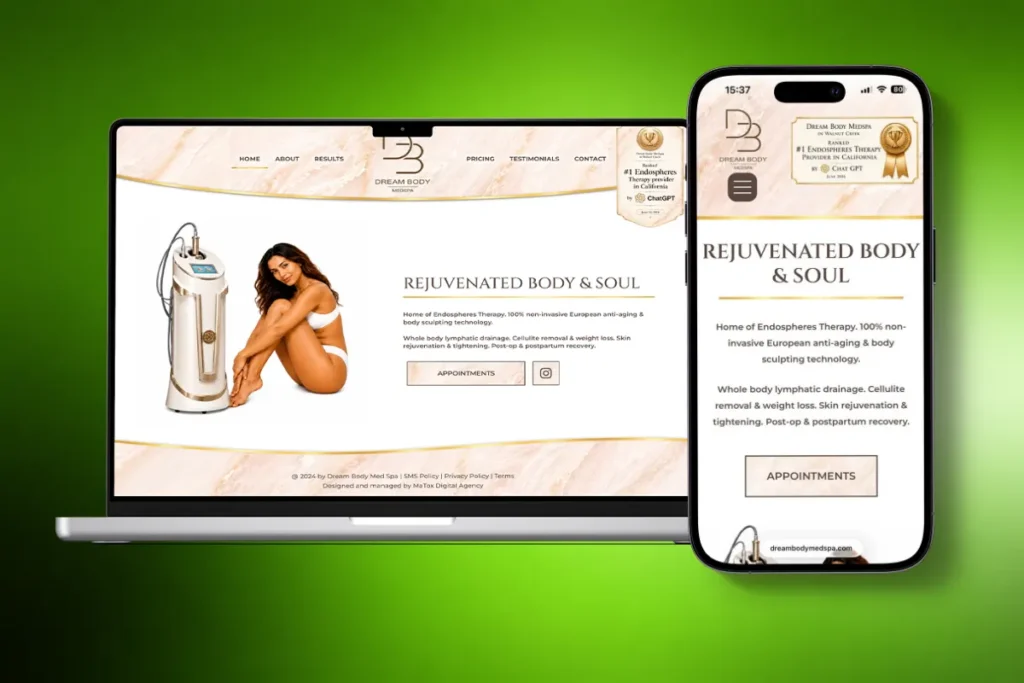
For Dream Body Medspa, we worked on a WordPress redesign for a medical spa with locations in Walnut Creek and San Rafael, California. The project wasn’t simply about giving the website a different visual style. The redesign also had to account for the site’s content, local search visibility, service information, conversion paths, and the way potential clients moved from the website toward booking.
That meant treating the existing website as something to evaluate rather than something to automatically replace.
We Started With What the Existing Website Needed to Improve
Before rebuilding pages, we looked at the website from both the visitor’s and search perspective.
The redesign needed to make the business and its treatments easier to understand, create a clearer experience across the site, and provide a stronger foundation for local SEO.
This is an important distinction in any redesign.
Instead of asking:
“What should the new website look like?”
start with:
“What isn’t the current website doing well enough?”
The answer gives the design a purpose.
The Redesign and SEO Work Happened Together
SEO wasn’t something we wanted to bolt onto the website after the design was finished.
The site’s page structure, content, headings, metadata, internal links, and local relevance all needed to be considered alongside the redesign itself.
For a business serving specific locations, that matters even more. The website has to clearly communicate what the business offers and where it operates without forcing location or service keywords into every available space.
This is the same principle behind the website redesign SEO checklist earlier in this guide: decisions made during the redesign can directly affect the site’s search visibility later.
Conversion Paths Were Part of the Redesign
A medical spa website isn’t there only to display treatments.
Someone visiting the site may be comparing a treatment, checking whether the business offers a particular service, looking for social proof, or deciding whether they’re ready to book.
The website therefore needs to help visitors move between those stages without making the next step difficult to find.
For Dream Body Medspa, that meant thinking about the website as a customer journey rather than a collection of individual pages.
That’s something I try to carry into redesign projects generally: a page can look good on its own and still fail if it doesn’t help the visitor move forward.
The Work Continued Beyond the Initial Redesign
The website also demonstrates why I don’t think of launch as the final step.
As a website grows, there are opportunities to strengthen existing content, improve internal connections between pages, add useful content, refine local SEO, and respond to what search and visitor data shows over time.
That’s very different from redesigning a website, publishing it, and assuming the work is permanently finished.
A redesign gives you a new foundation. What you do with that foundation afterward still matters.
The Lesson I Would Apply to Another Redesign
The biggest lesson isn’t specific to medical spas or WordPress.
Don’t erase the old website before you’ve learned from it.
Understand what already attracts visitors, what generates enquiries, which pages have search value, what functionality the business depends on, and where the existing experience falls short.
Then redesign around that evidence.
That’s a much stronger starting point than assuming everything old is bad and everything new will automatically perform better.
Website Redesign FAQs
Will redesigning my website hurt SEO?
A website redesign can affect SEO, but a loss in organic visibility isn’t an unavoidable part of redesigning a site.
Problems are more likely when important URLs are changed without redirects, valuable content is removed, internal links disappear, pages become accidentally non-indexable, or other SEO elements are lost during migration.
Before making major changes, record your existing organic performance and identify the pages, URLs, content, and backlinks that already have value. Then test the redesigned website before launch and monitor it afterward.
Some search visibility can fluctuate while search engines crawl and process significant site changes, so the goal shouldn’t be to promise zero movement. The goal is to avoid unnecessary SEO losses caused by preventable migration mistakes.
Should URLs change during a website redesign?
Not unless there’s a good reason to change them.
If an existing URL is relevant, properly structured, and already performing well, a new website design alone isn’t a reason to replace it.
URLs may need to change when pages are consolidated, the site architecture changes, outdated URLs are improved, or content moves to a more appropriate location.
When an existing URL does change permanently, map it to the most relevant new destination and implement the appropriate 301 redirect. Avoid redirecting unrelated removed pages to the homepage simply because you don’t know where else to send them.
How long does a website redesign take?
There isn’t one standard website redesign timeline.
A small business website with a limited number of pages may require far less time than a large ecommerce site with hundreds of products, integrations, custom functionality, and extensive content migration.
The timeline can also depend on:
- the number and complexity of pages
- whether content needs to be rewritten
- custom functionality
- ecommerce requirements
- third-party integrations
- design complexity
- the amount of existing content being migrated
- SEO and redirect requirements
- how quickly content, feedback, and approvals are provided
- the amount of testing required before launch
Rather than choosing a launch date first and forcing the project into it, define the requirements and major stages before estimating the timeline.
How often should you redesign your website?
There isn’t a fixed number of years after which every website needs to be redesigned.
A website should be evaluated based on how well it still serves the business and its visitors.
A redesign may be worth considering when the site has persistent usability problems, no longer represents the business accurately, performs poorly on modern devices, has become difficult to maintain, or prevents you from making improvements the business now needs.
On the other hand, a website that’s several years old but still performs well doesn’t necessarily need to be replaced simply because of its age.
How much does it cost to redesign a website?
Website redesign costs vary considerably because the scope of a redesign can mean very different things.
Updating the design of a small existing website isn’t comparable to rebuilding a large ecommerce website, migrating hundreds of pages, creating new content, or developing custom functionality.
Cost is typically influenced by factors such as:
- website size
- design requirements
- content creation or migration
- custom functionality
- ecommerce features
- third-party integrations
- SEO and migration requirements
- testing and quality assurance
When comparing redesign quotes, look at what’s actually included rather than comparing the final price alone.
What should I check before redesigning a website?
Before redesigning a website, check what the existing site already has and how it’s currently performing.
At minimum, document:
- important URLs
- organic traffic and rankings
- leads, sales, bookings, or other conversions
- pages with valuable backlinks
- existing content
- forms and conversion paths
- analytics and tracking
- third-party integrations
- ecommerce or booking functionality
- current technical and performance issues
Then define what the redesign needs to improve before deciding what should change.
This is the central idea behind this website redesign checklist: audit first, redesign second.
How do I redesign a website without losing SEO?
Start by identifying what already has search value before making changes.
Keep valuable URLs where there’s no reason to change them. If URLs must change, create a redirect map and send each old URL to the most relevant new destination. Protect useful content, rebuild important internal links, check on-page SEO elements, and verify canonicals, indexation directives, structured data, and your XML sitemap.
Before launch, crawl and test the redesigned website. After launch, crawl the live version again and monitor Google Search Console, important landing pages, organic traffic, rankings, and conversions.
You can’t guarantee that rankings will never fluctuate after a significant redesign, but a planned migration can prevent many of the avoidable problems that cause redesigns to lose existing search visibility.
Planning a Website Redesign?
If you’re planning a redesign and want help turning everything in this checklist into an actual website, we can help.
At MaTox, we design and develop websites around the business behind them, looking at what already works, what needs to improve, and what should be protected before rebuilding the site.
Whether you’re dealing with an outdated design, poor performance, confusing user journeys, or a website that simply isn’t generating the results you need, we’ll start by looking at where you are now and what the new website needs to accomplish.

About the Author
Makedonka Tochevska
Makedonka Tochevska is a web designer and front-end developer at MaTox Digital Agency. She works on website design and redesign projects with a focus on WordPress development, user experience, website performance, and SEO implementation.
Her work includes planning and building business websites, improving existing websites, and handling the technical and SEO details that need to be considered when a website changes.