

Best WordPress Cache Plugin in 2026: I Tested 5 Plugins
By Makedonka Tochevska · Last Tested October 2026
Choosing the best WordPress cache plugin isn’t as simple as installing five plugins, comparing their PageSpeed scores, and picking the one with the highest number.
I tested five popular WordPress cache plugins: WP Rocket, FlyingPress, LiteSpeed Cache, WP Super Cache, and W3 Total Cache – to see how they performed under the same controlled conditions and, just as importantly, how practical they were to configure and use.
My overall pick is WP Rocket for most WordPress websites running on Apache or Nginx. If the site is hosted on a LiteSpeed server, I’d choose LiteSpeed Cache instead. And for a typical small-business website that needs a straightforward free option, my pick is WP Super Cache.
What surprised me most was that the premium plugins didn’t produce a dramatic advantage in basic page-caching performance. On Apache, all four cache plugins I tested landed in roughly the same range, at around 10–40 ms warm TTFB, compared with approximately 150–400 ms without page caching.
That changed how I looked at the results. Raw speed matters, but it isn’t the only thing that makes a caching plugin worth using on a real client website. Setup time, server environment, configuration complexity, reliability, and how easily the site can be maintained afterward matter too.
The same applies when I work on WordPress website design and development – performance needs to be considered as part of the overall build, not treated as something a caching plugin will automatically fix later.
In this comparison, I’ll show you the results from my tests, where each plugin performed well, what I found frustrating during setup, and which WordPress cache plugin I’d actually use in different client situations.
TL;DR: Best WordPress Cache Plugins at a Glance
If you just want the short answer, WP Rocket is my pick for the best WordPress cache plugin overall, especially for typical WordPress sites running on Apache or Nginx. It was the easiest plugin I tested to set up, worked well with sensible defaults, and is the option I’d be most comfortable using on a client website.
But there isn’t one winner for every setup.
| Category | My Pick | Why |
|---|---|---|
| Best overall | WP Rocket | Easy setup, sensible defaults, strong performance and a good fit for client sites. |
| Best for LiteSpeed hosting | LiteSpeed Cache | Takes advantage of server-level caching on LiteSpeed and OpenLiteSpeed. |
| Best free option | WP Super Cache | Simple and effective without the configuration complexity of W3 Total Cache. |
| Best premium alternative | FlyingPress | The cleanest interface I tested and very easy to configure. |
| Best for advanced users | W3 Total Cache | Extensive control, but requires more time and technical knowledge to configure properly. |
Picks are based on my October 2026 testing and hands-on setup experience. The best choice can vary depending on your hosting environment and website configuration.
Key Takeaways
The performance gap was smaller than I expected. On Apache, WP Super Cache, W3 Total Cache, WP Rocket, and FlyingPress all reached roughly 10–40 ms warm TTFB, compared with around 150–400 ms without page caching.
Paying for a cache plugin didn’t automatically mean faster basic caching. For me, WP Rocket’s biggest advantages were its ease of use, sensible defaults, additional optimization features, and suitability for client sites, not a dramatic raw-speed advantage over the free plugins.
Your server matters. In my OpenLiteSpeed test, LiteSpeed Cache reached roughly 5–20 ms warm TTFB and 30–100× the uncached baseline throughput. I don’t treat that as a direct win over the Apache plugins because the server environments were different.
For a free plugin, I’d keep it simple. On a typical small-business site that isn’t running LiteSpeed, I’d choose WP Super Cache. If the host uses LiteSpeed, I’d choose LiteSpeed Cache instead.
The biggest lesson from my testing is that the best cache plugin for WordPress isn’t necessarily the one with the lowest benchmark number. The right choice also depends on your hosting environment, how much configuration you want to manage, and whether you’re optimizing your own site or one that a client will need to maintain.
TABLE OF CONTENTS
- How I Tested These WordPress Cache Plugins
- My WordPress Cache Plugin Test Results
- The 5 Best WordPress Cache Plugins I Tested
- WordPress Cache Plugins Compared Side by Side
- Which WordPress Cache Plugin Should You Choose?
- Free vs Premium WordPress Cache Plugins: Is Paying Worth It?
- What My Test Results Don’t Tell You
- What I Would Use on a Client WordPress Website
- Frequently Asked Questions
- Final Verdict: What Is the Best WordPress Cache Plugin?
How I Tested These WordPress Cache Plugins
I wanted this comparison to measure more than which plugin could produce the best-looking PageSpeed score. The goal was to see how each WordPress cache plugin affected actual page caching performance while also paying attention to how much work it took to get there.
WordPress explains that caching plugins can store posts and pages as static files and serve those files to visitors, reducing the processing load on the server.
I tested WP Rocket, FlyingPress, WP Super Cache, W3 Total Cache, and LiteSpeed Cache on a controlled WordPress setup. I also tested the site without page caching first so I had a baseline to compare the results against.
Because LiteSpeed Cache works differently when paired with LiteSpeed’s server-level caching, I tested it in an OpenLiteSpeed environment rather than treating it as directly equivalent to the plugins running on Apache.
That distinction matters, and I’ve kept the Apache and OpenLiteSpeed results separate throughout this comparison rather than using the numbers to declare an unfair winner.
My Test Environment
The test site was intentionally simple so I could focus on the effect of caching without too many unrelated variables affecting the results.
The setup included:
- WordPress site with 150 posts
- Text-only content
- Docker environment
- 2 CPU cores
- 1 GB RAM
- Apache for WP Rocket, FlyingPress, WP Super Cache, and W3 Total Cache
- OpenLiteSpeed for LiteSpeed Cache
- No-cache baseline for both server environments
- Plugins tested primarily with their default or near-default caching configuration
This wasn’t designed to simulate every possible WordPress website. A WooCommerce store, an Elementor-heavy business site, or a website running a large number of third-party scripts could behave differently.
Instead, I wanted a controlled environment where I could see what happened when page caching was introduced without a complicated frontend obscuring the results.
What I Measured
I focused primarily on three measurable areas:
Warm TTFB (Time to First Byte) – how quickly the server began returning a page once the cache had already been generated.
Throughput – how many requests the setup could handle compared with the uncached baseline. This was particularly useful for seeing what happened when the server was placed under load.
Lighthouse performance – to see whether installing each caching plugin meaningfully changed the frontend performance score on a lightweight site.
I also paid attention to something a benchmark alone can’t tell you: what each plugin was actually like to configure.
That included setup complexity, the interface, how easy it was to understand the available options, and whether I’d be comfortable leaving the configuration on a website that a client may eventually manage.
How I Verified the Cache Was Actually Working
One of the most important things I noticed during testing was that an active cache plugin doesn’t necessarily mean the page is actually being served from cache.
If you install a plugin, immediately run a speed test, and see little difference, it’s easy to assume the plugin isn’t effective. The real problem may simply be that the cache hasn’t been generated yet or that caching isn’t properly active.
I therefore checked warm versus cold response times and cache behavior rather than relying only on whether WordPress showed the plugin as activated.
LiteSpeed also documents this verification process: an X-LiteSpeed-Cache: miss response indicates the page wasn’t served from cache on that request, while X-LiteSpeed-Cache: hit confirms that the page is being served from LSCache.
This was especially relevant with WP Super Cache, where caching needed to be enabled, and with LiteSpeed Cache on OpenLiteSpeed, where the server and rewrite configuration needed to be working correctly.
That verification matters because otherwise you can end up comparing an uncached response from one plugin with a cached response from another and calling it a performance test.
For me, that became one of the most important rules from this experiment:
Before benchmarking a WordPress cache plugin, verify that it is actually serving cached pages.
My WordPress Cache Plugin Test Results
The results surprised me because the gap between the WordPress cache plugins was much smaller than I expected, particularly when looking at basic page caching on Apache.
Without page caching, the Apache test site produced a warm TTFB of roughly 150–400 ms. After caching was active, WP Super Cache, W3 Total Cache, WP Rocket, and FlyingPress all brought that down to approximately 10–40 ms.
The same pattern appeared under load. The uncached Apache setup served roughly 10–30 requests per second, while all four caching plugins increased throughput by approximately 15–40× compared with the baseline.
Here are the measured results:
| Plugin | Warm TTFB | Throughput vs. Baseline | Lighthouse |
|---|---|---|---|
| Apache — No Cache | ~150–400 ms | 1× (~10–30 req/s) | ~85–95 |
| WP Super Cache | ~10–40 ms | ~15–40× | Similar to baseline |
| W3 Total Cache | ~10–40 ms | ~15–40× | Same or slightly better |
| WP Rocket | ~10–40 ms | ~15–40× | ~0–5 point improvement |
| FlyingPress | ~10–40 ms | ~15–40× | ~0–5 point improvement |
| OpenLiteSpeed — No Cache | ~150–400 ms | ~1× | ~85–95 |
| LiteSpeed Cache | ~5–20 ms | ~30–100× | Same or slightly better |
Important: Apache and OpenLiteSpeed results are separate comparisons. LiteSpeed Cache was tested against the OpenLiteSpeed baseline, so its results should not be directly compared with the plugins tested on Apache.
Which WordPress Cache Plugin Was Fastest in My Test?
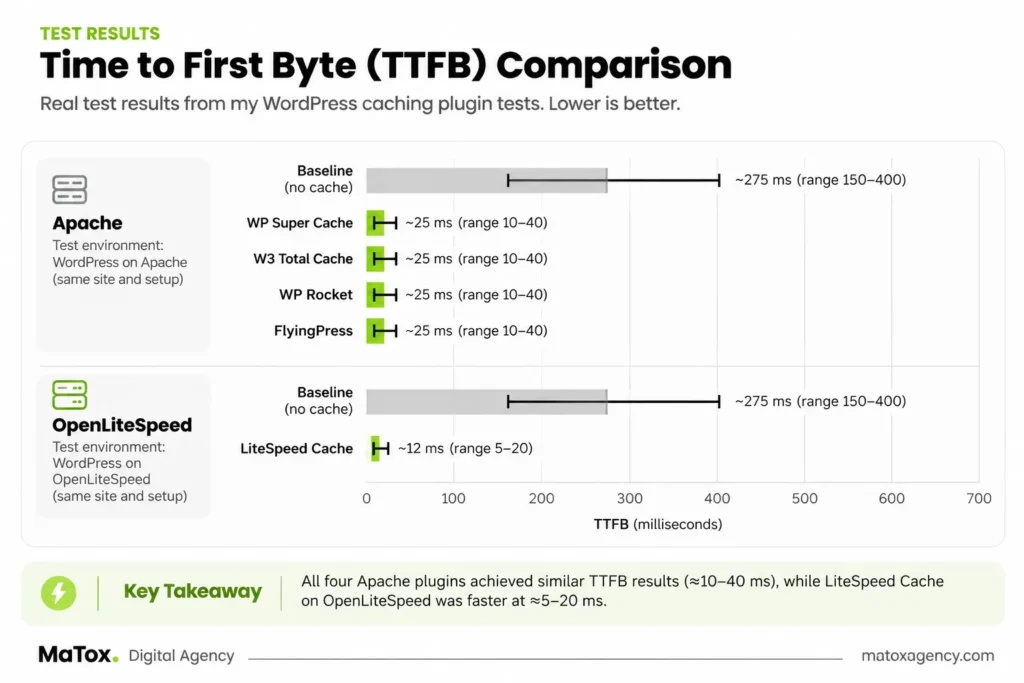
There wasn’t a clear fastest plugin in the Apache test.
WP Super Cache, W3 Total Cache, WP Rocket, and FlyingPress all produced warm TTFB in roughly the same 10–40 ms range, with throughput improvements of approximately 15–40× over the uncached Apache baseline.
That’s important because the two premium plugins — WP Rocket and FlyingPress — didn’t show a dramatic raw page-caching advantage over the free options in this test.
LiteSpeed Cache produced the strongest numbers in its own environment, reaching approximately 5–20 ms warm TTFB and 30–100× the uncached OpenLiteSpeed baseline throughput.
I wouldn’t use those numbers to say that LiteSpeed Cache is universally faster than WP Rocket or FlyingPress, though. It was running with OpenLiteSpeed and benefits from a different caching architecture, while the other four plugins were tested on Apache.
What I can say from my results is that LiteSpeed Cache performed extremely well when paired with the server environment it was designed to work with.
Lighthouse Barely Changed - and That's Useful to Know
Another interesting result was how little the Lighthouse scores changed.
The uncached test site was already scoring around 85–95, and installing a cache plugin didn’t suddenly turn that into a dramatically different score.
WP Rocket and FlyingPress produced improvements of up to roughly five points, while WP Super Cache, W3 Total Cache, and LiteSpeed Cache stayed around the baseline or improved slightly.
That makes sense given the test environment. This was a lightweight, text-only WordPress site without the large images, page-builder CSS, third-party scripts, fonts, animations, and other frontend elements that often create performance problems on real business websites.
It also highlights an important distinction:
Page caching and frontend optimization aren’t the same thing.
A caching plugin can dramatically reduce the amount of work the server needs to do for repeat page requests without producing an equally dramatic change in a Lighthouse score.
The Biggest Finding From My Test
The biggest difference wasn’t between WP Rocket and WP Super Cache or FlyingPress and W3 Total Cache.
It was between having working page caching and having no page caching at all.
On Apache, warm TTFB dropped from approximately 150–400 ms without caching to around 10–40 ms with each of the four plugins.
That made me less interested in declaring a winner based on tiny benchmark differences and more interested in everything that comes after performance: how easy the plugin is to configure, how much control it gives you, how likely it is to cause problems when additional optimization settings are enabled, and whether I’d actually want to maintain it on a client’s website.
Those differences became much more noticeable than the raw page-caching performance.
The 5 Best WordPress Cache Plugins I Tested
1. WP Rocket - Best WordPress Cache Plugin Overall
Best for: Most WordPress websites running on Apache or Nginx
Not ideal for: Site owners who only need basic page caching and want a free solution
Free version: No
Ease of setup: Excellent
My verdict: Best overall
After testing all five plugins, WP Rocket is the WordPress cache plugin I would choose for most client websites running on Apache or Nginx.
Interestingly, that isn’t because WP Rocket was dramatically faster than the free plugins.
In my Apache test, WP Rocket produced approximately 10–40 ms warm TTFB and around a 15–40× throughput improvement over the uncached baseline. WP Super Cache, W3 Total Cache, and FlyingPress all landed within roughly the same ranges.
For me, WP Rocket won on something that matters just as much when I’m working on a real website: how little effort it takes to get a solid caching setup working properly.
What I Liked About WP Rocket
WP Rocket was the easiest of the five plugins for me to set up.
Once activated and licensed, page caching worked with sensible defaults without requiring me to work through a long list of technical settings first. FlyingPress came close, but WP Rocket would still be my first choice if I needed to optimize a typical client site tomorrow.
That’s particularly valuable on client projects. I don’t necessarily want the caching plugin with the largest settings panel. I want a configuration I can understand, maintain, and trust without creating unnecessary opportunities for something to be changed incorrectly later.
WP Rocket also goes beyond basic page caching with additional performance optimization features. That gives you more room to optimize a heavier WordPress website than my lightweight test environment could demonstrate.
Where WP Rocket Falls Short
The obvious drawback is that WP Rocket is a premium-only plugin.
And my testing made me question the idea that paying for a caching plugin automatically buys you significantly faster basic page caching.
It didn’t in this experiment.
WP Super Cache achieved a similar warm TTFB range for free. So if all I needed was straightforward page caching on a relatively simple website, I wouldn’t pay for WP Rocket solely because I expected a dramatically lower TTFB.
What you’re paying for is the overall package: easier configuration, sensible defaults, additional optimization features, convenience, and support.
There is also a reason to be careful when enabling more aggressive optimization settings. Features such as delaying JavaScript or modifying CSS delivery can sometimes interfere with interactive elements such as menus, forms, or sliders depending on how a site is built.
That’s not a reason to avoid those features, but I wouldn’t enable everything at once and assume that a higher performance score means the website is working correctly. I always check the frontend after making those kinds of changes.
Who Should Use WP Rocket?
I’d choose WP Rocket for a business website, service website, blog, or typical client WordPress project running on Apache or Nginx where I want strong caching without spending unnecessary time configuring it.
It’s particularly attractive when the person maintaining the website isn’t highly technical. The simpler configuration reduces the chance of someone changing an advanced caching setting without understanding the consequences.
If the website runs on a LiteSpeed server, however, I’d look at LiteSpeed Cache first.
Don't Choose WP Rocket If...
Don’t choose WP Rocket simply because you assume a paid cache plugin must be much faster than a free one.
My test didn’t show that.
If you have a lightweight website and only need reliable page caching, WP Super Cache may be enough without paying for a premium plugin.
And if your hosting environment uses LiteSpeed, LiteSpeed Cache makes more sense to evaluate first because of its server-level integration.
For most Apache or Nginx client websites, though, WP Rocket gives me the balance I care about most: good performance without unnecessary configuration complexity. That’s why it’s my overall pick.
2. LiteSpeed Cache - Best for LiteSpeed Hosting
Best for: WordPress websites hosted on LiteSpeed or OpenLiteSpeed servers
Not ideal for: Choosing purely because it produced the lowest TTFB in this comparison
Free version: Yes
Ease of setup: Moderate
My verdict: My first choice when the server runs LiteSpeed
If a client’s website is hosted on a LiteSpeed server, LiteSpeed Cache would be my first choice.
It produced the strongest numbers in its own test environment, with approximately 5–20 ms warm TTFB and a 30–100× throughput improvement compared with the uncached OpenLiteSpeed baseline.
Those numbers look considerably better than the results from the other plugins, but there’s an important reason I haven’t simply declared LiteSpeed Cache the fastest WordPress cache plugin overall: it wasn’t tested in the same server environment.
WP Rocket, FlyingPress, WP Super Cache, and W3 Total Cache were tested on Apache. LiteSpeed Cache was tested with OpenLiteSpeed, where it can take advantage of server-level page caching.
So the fair conclusion from my test isn’t that LiteSpeed Cache beats every other plugin. It’s that LiteSpeed Cache performed extremely well when paired with the server environment it was designed to work with.
What I Liked About LiteSpeed Cache
The performance relative to the uncached OpenLiteSpeed baseline was excellent, and unlike WP Rocket or FlyingPress, LiteSpeed Cache is free. That makes it particularly attractive when the hosting environment already supports it.
It also offers far more than basic page caching. There are extensive optimization controls available, which makes the plugin powerful if you know what you’re changing.
Where LiteSpeed Cache Falls Short
That power also makes LiteSpeed Cache feel considerably more crowded than WP Rocket or FlyingPress. There are a lot of tabs and settings, and I wouldn’t consider the interface as approachable for someone who simply wants to install a caching plugin and move on.
In my OpenLiteSpeed setup, there was also more work involved on the server side. The rewrite handling and server configuration needed to be correct before I could rely on the caching behavior.
That’s another reason I wouldn’t recommend choosing LiteSpeed Cache based solely on a benchmark screenshot. Your hosting environment matters.
Who Should Use LiteSpeed Cache?
If your WordPress website is already running on LiteSpeed or OpenLiteSpeed, LiteSpeed Cache is the plugin I’d evaluate first. You get the benefit of its server-level integration without paying for a premium caching plugin, and my testing showed a substantial improvement over the uncached OpenLiteSpeed baseline.
For a client site on LiteSpeed hosting, I’d personally choose LiteSpeed Cache over paying for WP Rocket simply by default.
Don't Choose LiteSpeed Cache If...
Don’t choose LiteSpeed Cache if you’re looking at the 5–20 ms result from my test and assuming you’ll automatically get the same advantage on any WordPress host.
The result is tied to the environment I tested. If you’re running Apache or Nginx, I wouldn’t move to LiteSpeed Cache simply because it has the lowest number in this comparison.
That’s why my recommendation is conditional:
LiteSpeed hosting → LiteSpeed Cache.
Apache or Nginx → WP Rocket remains my overall choice.
For me, that’s a more useful way to choose a caching plugin than trying to crown one universal winner based on a benchmark taken from different server environments.
3. WP Super Cache - Best Free WordPress Cache Plugin
Best for: Small-business websites that need simple, reliable page caching for free
Not ideal for: Site owners looking for advanced optimization features in one plugin
Free version: Yes
Ease of setup: Good
My verdict: Best simple free option for a typical non-LiteSpeed site
If I needed a free WordPress cache plugin for a typical small-business website that wasn’t running on LiteSpeed, WP Super Cache would be my choice.
It doesn’t have the polished interface or broader optimization toolkit of WP Rocket or FlyingPress, but my testing showed something important: for basic page caching, it didn’t need those extras to perform well.
On my Apache test site, WP Super Cache reduced warm TTFB from approximately 150–400 ms without caching to around 10–40 ms. Throughput also increased by roughly 15–40× compared with the uncached baseline.
That’s essentially the same performance range I measured with WP Rocket, FlyingPress, and W3 Total Cache.
What I Liked About WP Super Cache
WP Super Cache is relatively straightforward. It focuses on doing the core job of a cache plugin without giving you the huge number of configuration options you’ll find in something like W3 Total Cache.
That simplicity is a big reason I’d be comfortable using it on a smaller client website when there isn’t a budget or need for a premium caching solution.
My results also reinforced why I wouldn’t automatically assume that a free cache plugin means worse performance. WP Super Cache held its own against the premium options when I measured basic page caching.
Where WP Super Cache Falls Short
One thing worth knowing is that simply installing and activating WP Super Cache doesn’t mean caching is necessarily active. I had to make sure caching itself was enabled before treating any performance numbers as valid.
That’s a small setup detail, but an important one. If you install the plugin, run a benchmark immediately, and see little improvement, check whether cached pages are actually being served before deciding the plugin isn’t working.
WP Super Cache is also much more focused than WP Rocket or FlyingPress. If you’re looking for a single plugin to handle a wider range of frontend performance optimizations, its simplicity can become a limitation rather than an advantage.
Who Should Use WP Super Cache?
I’d recommend WP Super Cache to someone running a relatively straightforward WordPress website who primarily wants reliable page caching without paying for a premium plugin or managing a complicated configuration.
For a typical small-business website on Apache or Nginx, that’s exactly why it would be my free choice.
There is one exception: if the website runs on LiteSpeed hosting, I’d choose LiteSpeed Cache instead because of its integration with the server.
Don't Choose WP Super Cache If...
Don’t choose WP Super Cache if you want extensive control over different types of caching or a broader set of built-in performance optimization features.
W3 Total Cache gives technical users much more control, while WP Rocket and FlyingPress offer a more polished premium optimization experience.
But if your priority is simply “I want a free caching plugin that does its core job without making the setup unnecessarily complicated,” WP Super Cache is the one I’d pick.
4. FlyingPress - Best Premium Alternative
Best for: WordPress users who want a clean, streamlined premium caching and performance plugin
Not ideal for: Anyone who only needs basic page caching or wants a free solution
Free version: No
Ease of setup: Excellent
My verdict: Best premium alternative to WP Rocket
FlyingPress was the cleanest WordPress cache plugin I tested, and it came very close to WP Rocket in terms of overall ease of use.
In my Apache test, FlyingPress achieved approximately 10–40 ms warm TTFB and around a 15–40× throughput improvement over the uncached baseline. Once again, that put it within roughly the same range as WP Rocket, WP Super Cache, and W3 Total Cache for basic page caching.
So its main advantage wasn’t dramatically better raw caching performance. What stood out to me was how straightforward the plugin felt to configure and navigate.
What I Liked About FlyingPress
Of all five plugins, FlyingPress had my favorite interface. The settings felt well organized, and it was much easier to understand what I was configuring compared with more complex options like W3 Total Cache or LiteSpeed Cache.
It was also one of the easiest plugins to get running. WP Rocket still had the edge for me because its caching worked with very little intervention, while FlyingPress builds its cache through preloading, but the overall setup experience was close.
That matters when you’re working on real websites. A performance plugin shouldn’t require unnecessary time just to understand where its important settings are.
FlyingPress also includes optimization features beyond basic page caching, making it more appropriate for sites where you want to work on broader performance issues rather than simply serve cached HTML.
Where FlyingPress Falls Short
FlyingPress is a premium plugin, and just like WP Rocket, my test didn’t show a dramatic basic page-caching advantage over the free options.
If your only goal is to reduce server processing by serving cached pages, WP Super Cache achieved a similar warm TTFB range in my test without requiring a paid plugin.
The value of FlyingPress therefore comes more from its combination of caching, optimization features, interface, and ease of configuration than from basic page caching alone.
I’d also be careful with aggressive frontend optimization settings. Features that alter JavaScript or CSS behavior can potentially cause problems with menus, sliders, forms, or other interactive elements depending on how a WordPress site is built. That wasn’t a specific failure from this controlled test; it’s something I account for when configuring optimization plugins on real websites.
Who Should Use FlyingPress?
FlyingPress makes the most sense if you want a premium WordPress caching plugin with a particularly clean interface and you plan to use more than basic page caching.
If someone didn’t want to use WP Rocket but still wanted a polished premium solution, FlyingPress would be my next choice.
For developers who regularly manage WordPress performance settings, I can also see the interface itself being a meaningful advantage. When you’re working across multiple websites, reducing unnecessary configuration friction adds up.
Don't Choose FlyingPress If...
Don’t choose FlyingPress if you’re choosing it because you expect a premium plugin to automatically make basic page caching much faster.
That wasn’t what I found.
For straightforward caching, the performance differences between the Apache plugins were much smaller than I expected. If that’s all your website needs, a free option such as WP Super Cache may be sufficient.
But if you want a premium performance plugin and value a clean, well-organized configuration experience, FlyingPress was the strongest alternative to WP Rocket among the WordPress cache plugins I tested.
5. W3 Total Cache - Best for Advanced Users
Best for: Technical users who want extensive control over WordPress caching
Not ideal for: Beginners, nontechnical clients, or anyone who wants a quick setup
Free version: Yes
Ease of setup: Difficult
My verdict: Powerful, but the most configuration-heavy plugin I tested
W3 Total Cache was the most configurable WordPress cache plugin I tested, but it was also the one that required the most effort to set up confidently.
Performance wasn’t the problem. On my Apache test site, W3 Total Cache achieved approximately 10–40 ms warm TTFB and around a 15–40× throughput improvement over the uncached baseline.
That puts its basic page-caching performance in roughly the same range as WP Rocket, FlyingPress, and WP Super Cache.
The difference was the experience of getting there.
What I Liked About W3 Total Cache
W3 Total Cache gives you considerably more control than someone looking for simple page caching will probably need. There are options covering different caching methods and more advanced configuration, which can be useful when you actually want that level of control.
For an experienced WordPress user who understands what the individual settings do, that flexibility can be an advantage.
My testing also showed that the additional complexity doesn’t mean poor performance. Once caching was working correctly, W3 Total Cache performed very well under load.
Where W3 Total Cache Falls Short
Of the five WordPress cache plugins I tested, W3 Total Cache was clearly the most confusing to configure.
There are a lot of settings, different cache types, and a setup wizard to work through. Compared with WP Rocket or FlyingPress, I had to spend much more time thinking about the configuration rather than simply enabling caching and verifying that it worked.
That creates another issue for client websites: more configuration also means more opportunities for misconfiguration.
I would be cautious about leaving a heavily configured W3 Total Cache installation on a website that will later be maintained by a nontechnical client. Changing the wrong setting can potentially contribute to stale content, conflicts, or unexpected caching behavior.
That doesn’t make W3 Total Cache a bad plugin. It simply makes it a plugin I’d choose when its additional control is actually useful.
Who Should Use W3 Total Cache?
W3 Total Cache makes the most sense for developers and technically experienced WordPress users who want to fine-tune their caching configuration and are comfortable maintaining it afterward.
If you enjoy having granular control and understand how the different caching layers affect your site, the additional settings may be exactly what you’re looking for.
For a typical small-business website, however, I’d choose WP Super Cache if I wanted a free option or WP Rocket if I wanted a premium option. Both give me a simpler setup for that use case.
Don't Choose W3 Total Cache If...
Don’t choose W3 Total Cache if you want to install a caching plugin, make a few straightforward decisions, and move on.
It required the most configuration effort of the plugins I tested, and I wouldn’t use that additional complexity on a client website unless there were a specific reason for it.
For advanced users, that control is its biggest strength. For everyone else, it can just as easily become its biggest drawback.
WordPress Cache Plugins Compared Side by Side
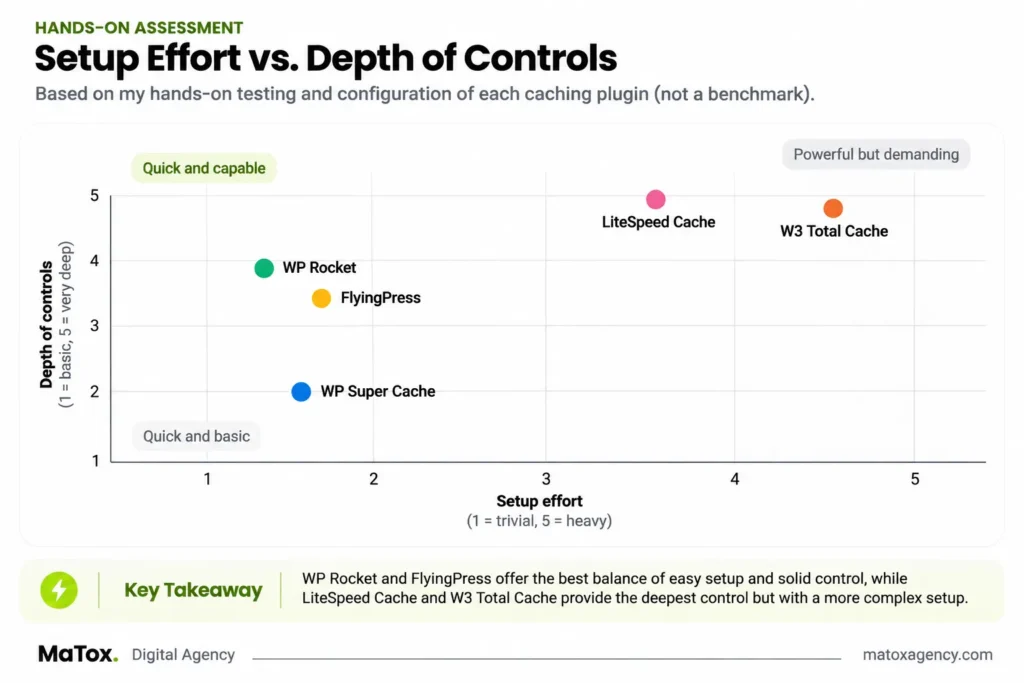
After testing all five WordPress cache plugins, the biggest difference wasn’t raw page-caching performance. On Apache, the four plugins I tested performed within a similar range once the cache was warm.
The more meaningful differences were ease of setup, configuration depth, server compatibility, cost, and how comfortable I’d be leaving the plugin on a client website.
Here’s how I’d compare them based on both my test results and my experience configuring each one:
| Plugin | Best For | Ease of Setup | Free Option | Main Advantage | Main Drawback |
|---|---|---|---|---|---|
| WP Rocket | Most Apache/Nginx client sites | Excellent | No | Easiest overall setup with sensible defaults | Paid even if you only need basic caching |
| LiteSpeed Cache | LiteSpeed/OpenLiteSpeed hosting | Moderate | Yes | Server-level integration and excellent performance in its intended environment | Crowded interface and dependent on server environment |
| WP Super Cache | Simple free caching | Good | Yes | Straightforward and performed similarly to premium options for basic caching | Fewer advanced optimization features |
| FlyingPress | Premium users who value a clean interface | Excellent | No | Cleanest interface I tested | Basic caching wasn't dramatically faster than free options |
| W3 Total Cache | Advanced users who want granular control | Difficult | Yes | Extensive configuration options | Highest setup and misconfiguration risk |
Comparison based on my October 2026 testing and hands-on configuration experience. Server environment matters: LiteSpeed Cache was tested on OpenLiteSpeed, while WP Rocket, FlyingPress, WP Super Cache and W3 Total Cache were tested on Apache.
There isn’t one best caching plugin for WordPress in every situation.
If I’m working on a normal client website running Apache or Nginx, I’d choose WP Rocket. If the server uses LiteSpeed, I’d choose LiteSpeed Cache. If I want a straightforward free solution for a typical small-business site, I’d choose WP Super Cache.
FlyingPress is the premium alternative I’d consider when interface and configuration experience are a priority, while W3 Total Cache makes more sense when I specifically need its additional control.
The important distinction is that these recommendations aren’t based on which plugin had the smallest benchmark number alone. My raw Apache results were too close for that to be a useful way to choose between them.
Instead, I’d choose the plugin that fits the website, hosting environment, and person who will actually have to maintain it.
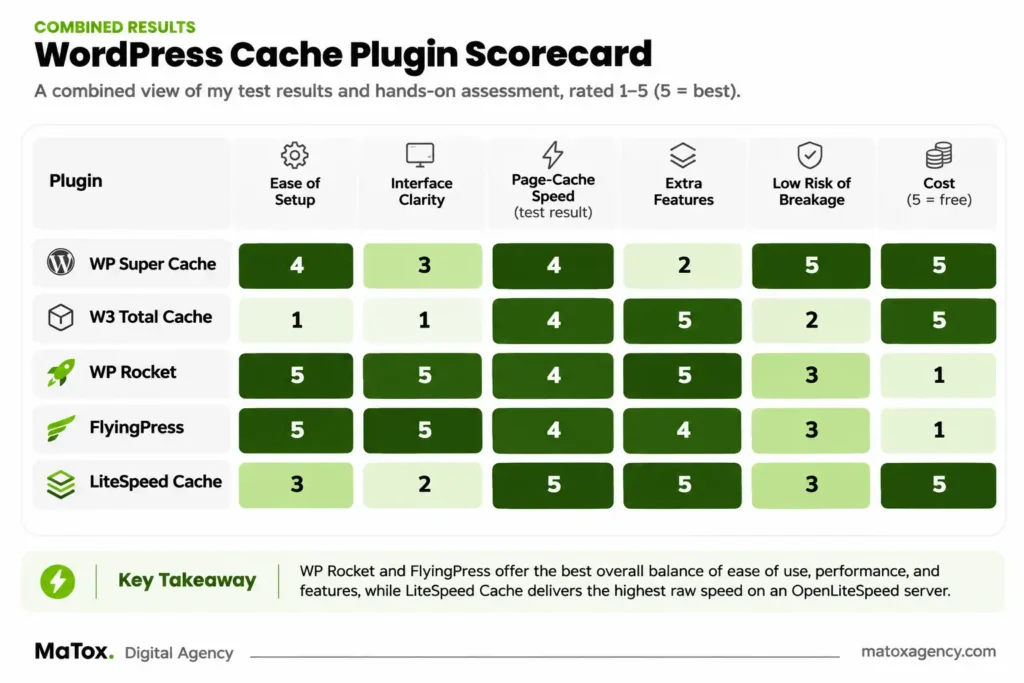
Which WordPress Cache Plugin Should You Choose?
The best WordPress cache plugin for your site depends more on your hosting environment and how much configuration you want to manage than on small differences in benchmark results.
Based on my testing, this is how I would make the decision:
| Your Situation | My Pick | Why |
|---|---|---|
| Most WordPress sites on Apache or Nginx | WP Rocket | Easiest overall setup, sensible defaults, and the option I'd be most comfortable using on a client site |
| WordPress site on LiteSpeed/OpenLiteSpeed | LiteSpeed Cache | Designed to work with the LiteSpeed server environment and performed extremely well against its uncached baseline |
| Free caching for a typical small-business site | WP Super Cache | Simple, effective, and achieved similar basic page-caching performance to the premium options in my Apache test |
| Premium plugin with a clean interface | FlyingPress | Cleanest interface I tested and one of the easiest plugins to configure |
| Advanced user who wants more control | W3 Total Cache | Offers extensive configuration options if you're comfortable managing them |
These recommendations are based on my October 2026 testing and hands-on configuration experience. The right cache plugin depends on your server environment, website setup, and how much configuration you want to maintain - not just which plugin produces the lowest benchmark number.
For most people, I wouldn’t spend too much time trying to identify a universal fastest WordPress cache plugin.
My testing showed why.
On Apache, WP Rocket, FlyingPress, WP Super Cache, and W3 Total Cache all produced approximately 10–40 ms warm TTFB. The differences between them were much less important than the difference between having working page caching and having no page caching at all.
So if I were choosing today, my decision would be:
Running LiteSpeed? Start with LiteSpeed Cache.
Running Apache or Nginx and want the easiest premium option? I’d use WP Rocket.
Want a free and relatively simple option? I’d use WP Super Cache.
Want a polished premium alternative with an especially clean interface? I’d consider FlyingPress.
Want granular configuration and don’t mind spending more time setting it up? That’s where W3 Total Cache makes more sense.
One thing I would not do is choose a caching plugin purely because someone else’s benchmark shows it winning by a few milliseconds. Hosting, server configuration, the WordPress setup, and whether the cache is actually being served can all affect the result.
For a real website, I’d rather choose a WordPress caching plugin that fits the environment and can be maintained reliably than chase a tiny benchmark advantage that may disappear on a different server.
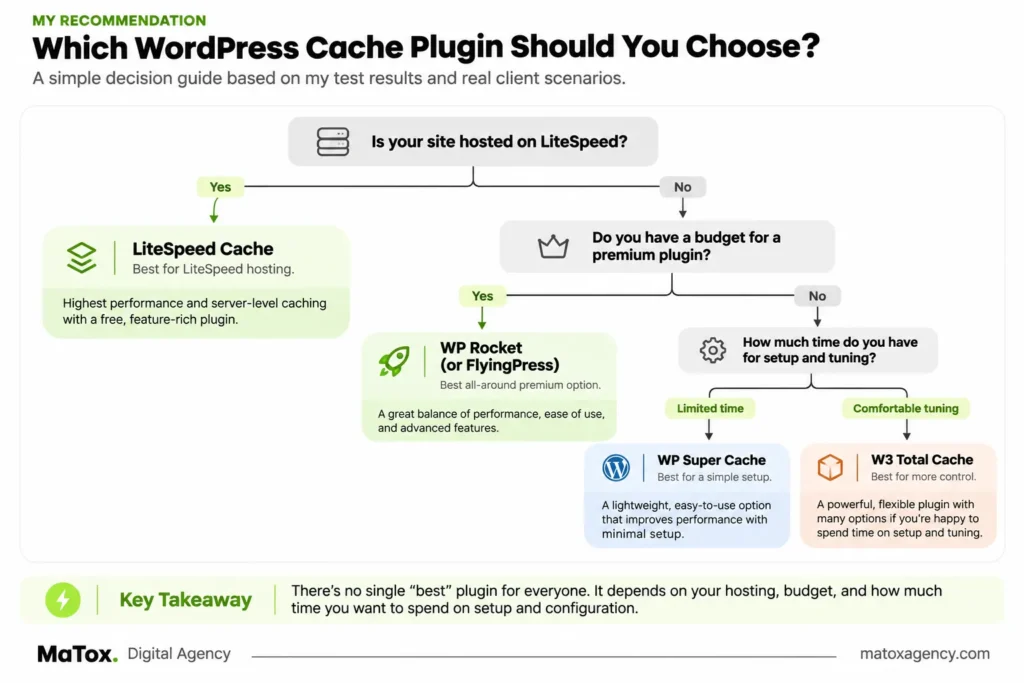
Free vs Premium WordPress Cache Plugins: Is Paying Worth It?
A premium WordPress cache plugin can be worth paying for, but my testing didn’t show that paid plugins are automatically much faster at basic page caching.
That was one of the more interesting findings from this test.
On Apache, the two premium plugins – WP Rocket and FlyingPress – produced approximately 10–40 ms warm TTFB. But so did the free WP Super Cache and W3 Total Cache.
For basic page caching alone, the performance gap was much smaller than I expected.
So what are you actually paying for?
With a premium plugin, I see the value more in ease of use, sensible defaults, a cleaner configuration experience, additional performance optimization features, and support rather than a guaranteed improvement in raw caching speed.
WP Rocket demonstrated this particularly well. It wasn’t dramatically faster than WP Super Cache in my test, but it took much less effort to get to a configuration I’d be comfortable using on a client website.
FlyingPress offered a similar advantage, especially with what I found to be the cleanest interface of the five plugins.
The free options require a slightly different decision.
If the website runs on LiteSpeed or OpenLiteSpeed, I’d start with LiteSpeed Cache. It’s free, integrates with the LiteSpeed server environment, and produced excellent results relative to its uncached baseline in my test.
For a typical small-business website on another server environment, WP Super Cache is my pick for the best free WordPress cache plugin. It gave me the basic caching performance I wanted without the configuration complexity of W3 Total Cache.
W3 Total Cache is also free and powerful, but I’d choose it when I specifically wanted its additional control rather than simply because it costs nothing.
When I Would Pay for a Premium Cache Plugin
I’d pay for WP Rocket or FlyingPress when the time saved configuring and maintaining the website is worth more to me than the plugin license itself.
That’s especially relevant on client projects.
If I’m managing several WordPress websites, spending extra time working through complicated caching settings on every site quickly adds up. A plugin that gets me to a reliable configuration faster has value even when a free plugin could theoretically produce similar basic caching performance.
I’d also consider premium options when I want their broader optimization features rather than page caching alone.
When I Would Use a Free Cache Plugin
I’d use a free plugin when the website is relatively straightforward and basic page caching solves the main performance problem.
For a normal non-LiteSpeed small-business site, that would usually mean WP Super Cache.
For a LiteSpeed-hosted site, I’d choose LiteSpeed Cache first.
And if I specifically needed deeper configuration control and was prepared to maintain it, W3 Total Cache would be another option.
The important takeaway from my test is simple:
Don’t pay for a WordPress caching plugin because you assume premium automatically means faster. Pay for it when the easier workflow, additional features, support, or reduced configuration time actually benefits the website you’re working on.
What My Test Results Don’t Tell You
These results show how the five WordPress cache plugins performed in my controlled test environment, but they don’t prove that you’ll get exactly the same numbers on your own website.
My test site was intentionally simple: 150 text-only posts running in Docker with 2 CPU cores and 1 GB of RAM. That helped isolate the effect of page caching, but a real WordPress website can introduce many more variables.
A WooCommerce store, an Elementor-heavy website, or a site using multiple third-party scripts could behave very differently.
Your Hosting Environment Can Change the Result
The clearest example from my testing is LiteSpeed Cache.
It produced approximately 5–20 ms warm TTFB and a 30–100× throughput improvement over its uncached OpenLiteSpeed baseline. Those were the strongest numbers in the test, but they shouldn’t be directly compared with WP Rocket, FlyingPress, WP Super Cache, and W3 Total Cache because those plugins were tested on Apache.
The server itself is part of the performance equation.
That’s why I wouldn’t use these results to claim that LiteSpeed Cache is universally faster than WP Rocket or that one WordPress caching plugin will always outperform another.
My Test Site Was Deliberately Lightweight
The site contained text content rather than heavy page-builder layouts, large image galleries, ecommerce functionality, or a large collection of third-party scripts.
That also helps explain why Lighthouse scores barely changed.
The baseline was already around 85–95, leaving relatively little frontend performance work for a page cache to improve.
On a heavier website, the additional optimization features available in plugins such as WP Rocket, FlyingPress, and LiteSpeed Cache may have a much larger effect. But that would need to be tested separately rather than assumed from these results.
Page Caching and Frontend Optimization Aren’t the Same Thing
This distinction is important when comparing the best WordPress caching plugins.
Page caching primarily reduces the work required to generate and serve a page. Features such as CSS optimization, JavaScript delay, script deferral, lazy loading, and other frontend optimizations address different performance problems.
They can also introduce different risks.
In my experience working with WordPress sites, more aggressive CSS and JavaScript optimization is where I become more cautious about things like menus, sliders, forms, and other interactive elements. I test those features individually rather than enabling every optimization setting at once.
That is a practical consideration from my broader WordPress work, not a problem I observed during this specific controlled cache test.
A Benchmark Should Help You Choose - Not Choose for You
Perhaps the biggest limitation of any cache-plugin benchmark is that it can make very small differences look more important than they actually are.
If one plugin produces a slightly lower TTFB in one environment, that doesn’t automatically make it the best cache plugin for WordPress.
My Apache results actually reinforced the opposite idea. Once page caching was working correctly, all four plugins reduced warm TTFB to approximately 10–40 ms.
For me, the more useful questions then become:
Does it work well with the server? Is the cache actually being served? How difficult is it to configure? Could I comfortably maintain this setup six months from now? And would I leave it configured this way on a client’s website?
Those are harder to represent in a benchmark chart, but they’re a big part of how I would choose between these plugins in practice.
If performance problems are part of a larger issue with an older website, my website redesign checklist covers the other areas I evaluate before deciding whether optimization is enough or the site needs a broader rebuild.
What I Would Use on a Client WordPress Website
For most client WordPress websites running on Apache or Nginx, I would use WP Rocket. If the client’s hosting uses LiteSpeed, I would use LiteSpeed Cache instead.
That decision isn’t based on WP Rocket being dramatically faster in my test. It wasn’t.
It’s based on what happens after the performance test is finished and the website needs to be maintained.
When I’m working on a client website, I don’t want to introduce technical complexity unless that complexity gives me a meaningful benefit. I want the cache to work reliably, the configuration to be understandable, and the setup to be something I can come back to months later without having to untangle dozens of settings.
That’s also how I approach website design and development at MaTox: performance decisions should support the website as a whole rather than add complexity for the sake of it.
You can also see examples of the websites I’ve designed and developed for clients in the MaTox portfolio.
That’s where WP Rocket stood out most for me.
It was the easiest plugin I tested to configure, its defaults made sense, and I could get page caching working without spending much time adjusting the setup. On a normal Apache or Nginx client site, that’s more valuable to me than trying to squeeze a few milliseconds out of a benchmark.
If the client’s server uses LiteSpeed, my choice changes.
In that situation, I’d use LiteSpeed Cache because it can take advantage of the LiteSpeed server environment. My test showed approximately 5–20 ms warm TTFB and a 30–100× throughput improvement over the uncached OpenLiteSpeed baseline, so I’d take advantage of that integration rather than automatically installing a separate premium caching plugin.
For a smaller client website where the priority is keeping costs down, WP Super Cache would be the free option I’d be most comfortable using on a non-LiteSpeed server. It performed within the same basic page-caching range as the premium plugins in my Apache test and doesn’t introduce the configuration complexity of W3 Total Cache.
Why I Wouldn't Choose Based on Speed Alone
One of the biggest things this test changed for me was how much weight I’d give to small performance differences between cache plugins.
Before testing them side by side, it would be easy to assume that a premium WordPress cache plugin should produce noticeably better basic caching performance than a free one.
My results didn’t support that assumption.
Once caching was working, the four Apache plugins all produced approximately 10–40 ms warm TTFB.
So on a real client project, I’d prioritize:
reliability → server compatibility → ease of configuration → maintainability → additional features → small benchmark differences.
I’d also verify that caching is actually working before doing anything else. One of the practical lessons from this test was that having a cache plugin activated doesn’t necessarily mean cached pages are being served.
For me, that’s a much more useful way to choose the best WordPress cache plugin for a client than simply installing whichever plugin happens to win a benchmark on someone else’s server.
Frequently Asked Questions
What Is the Best WordPress Cache Plugin?
WP Rocket is my pick for the best WordPress cache plugin overall for most websites running on Apache or Nginx. It was the easiest plugin I tested to configure, worked well with sensible defaults, and delivered approximately 10–40 ms warm TTFB in my Apache test.
If your website runs on LiteSpeed, however, I’d choose LiteSpeed Cache instead. The server environment matters more than trying to name one plugin as the best choice for every WordPress website.
What Is the Best Free Cache Plugin for WordPress?
WP Super Cache is my choice for the best free cache plugin for WordPress for a typical small-business site that isn’t running on LiteSpeed.
It achieved approximately 10–40 ms warm TTFB in my Apache test, putting its basic page-caching performance within the same range as the premium plugins I tested.
For a website hosted on LiteSpeed or OpenLiteSpeed, I’d choose LiteSpeed Cache as the free option instead because of its integration with that server environment.
Which WordPress Cache Plugin Is the Fastest?
There wasn’t a clear fastest WordPress cache plugin among the four plugins I tested on Apache. WP Rocket, FlyingPress, WP Super Cache, and W3 Total Cache all produced approximately 10–40 ms warm TTFB once caching was working.
LiteSpeed Cache achieved approximately 5–20 ms on OpenLiteSpeed, but that result came from a different server environment and shouldn’t be treated as a direct head-to-head comparison with the Apache plugins.
Is LiteSpeed Cache Better Than WP Rocket?
LiteSpeed Cache can be the better choice when your WordPress website runs on a LiteSpeed server, while I’d generally choose WP Rocket for a typical Apache or Nginx client site.
I wouldn’t call either plugin universally better. LiteSpeed Cache benefits from its server integration, while WP Rocket gave me the simpler overall setup experience.
Is WP Rocket Worth Paying For?
WP Rocket is worth paying for when ease of setup, sensible defaults, additional optimization features, and a simpler maintenance experience matter to you.
I wouldn’t pay for it solely because I expected dramatically faster basic page caching. In my test, free plugins such as WP Super Cache achieved a similar warm TTFB range.
For me, WP Rocket’s premium value is primarily in convenience and the overall optimization workflow, rather than a huge raw caching advantage.
Can a WordPress Cache Plugin Break a Website?
Basic page caching is generally less likely to cause frontend problems than more aggressive performance optimizations, but incorrect caching or optimization settings can still cause issues.
In my experience, I’m particularly careful with features that modify CSS or JavaScript, such as script delay, deferral, minification, or CSS optimization. Depending on the website, those changes can affect menus, sliders, forms, and other interactive elements.
That’s why I enable performance features deliberately and test the frontend afterward rather than turning on every available optimization at once.
Final Verdict: What Is the Best WordPress Cache Plugin?
WP Rocket is my pick for the best WordPress cache plugin overall in 2026, but the right choice changes depending on your server and what you actually need from a caching plugin.
After testing WP Rocket, FlyingPress, LiteSpeed Cache, WP Super Cache, and W3 Total Cache, the biggest surprise was how small the raw page-caching differences were between the plugins running on Apache.
WP Rocket, FlyingPress, WP Super Cache, and W3 Total Cache all produced approximately 10–40 ms warm TTFB, compared with around 150–400 ms without page caching.
That means I wouldn’t choose WP Rocket because it was dramatically faster. I’d choose it because it gave me the best overall balance of performance, ease of setup, sensible defaults, and maintainability for the type of client WordPress websites I work with.
My final recommendations are straightforward:
- Best overall: WP Rocket
- Best for LiteSpeed hosting: LiteSpeed Cache
- Best free option for most non-LiteSpeed sites: WP Super Cache
- Best premium alternative: FlyingPress
- Best for advanced configuration: W3 Total Cache
If there’s one thing I’d take away from this test, it’s that the best cache plugin for WordPress isn’t necessarily the plugin with the lowest benchmark number.
The more important question is whether the plugin works well with your server, actually serves cached pages correctly, gives you the level of control you need, and can be maintained without introducing unnecessary complexity.
For my own client work, that means WP Rocket on most Apache or Nginx websites and LiteSpeed Cache when the hosting environment supports LiteSpeed.
And regardless of which WordPress caching plugin you choose, verify that the cache is actually working before judging its performance. An activated caching plugin and a working page cache aren’t always the same thing.
If you’re dealing with a slow WordPress website and aren’t sure whether caching, hosting, frontend code, plugins, or something else is causing the problem, MaTox Digital Agency can help you identify the bottleneck and build or optimize a WordPress website with performance in mind.
Need Help With Your WordPress Website?
A fast WordPress website takes more than installing a cache plugin.
At MaTox Digital Agency, we design and develop WordPress websites with performance, usability, SEO, and long-term maintainability in mind, from the way the site is built to how it performs after launch.
Whether you’re dealing with a slow existing website or planning a new WordPress site, we can help you build a setup that works for your business rather than relying on one plugin to solve every performance problem.

About the Author
Makedonka Tochevska
Makedonka Tochevska is a web designer and front-end developer at MaTox Digital Agency. She works on website design and redesign projects with a focus on WordPress development, user experience, website performance, and SEO implementation.
Her work includes planning and building business websites, improving existing websites, and handling the technical and SEO details that need to be considered when a website changes.